Navigating the Knowledge Base
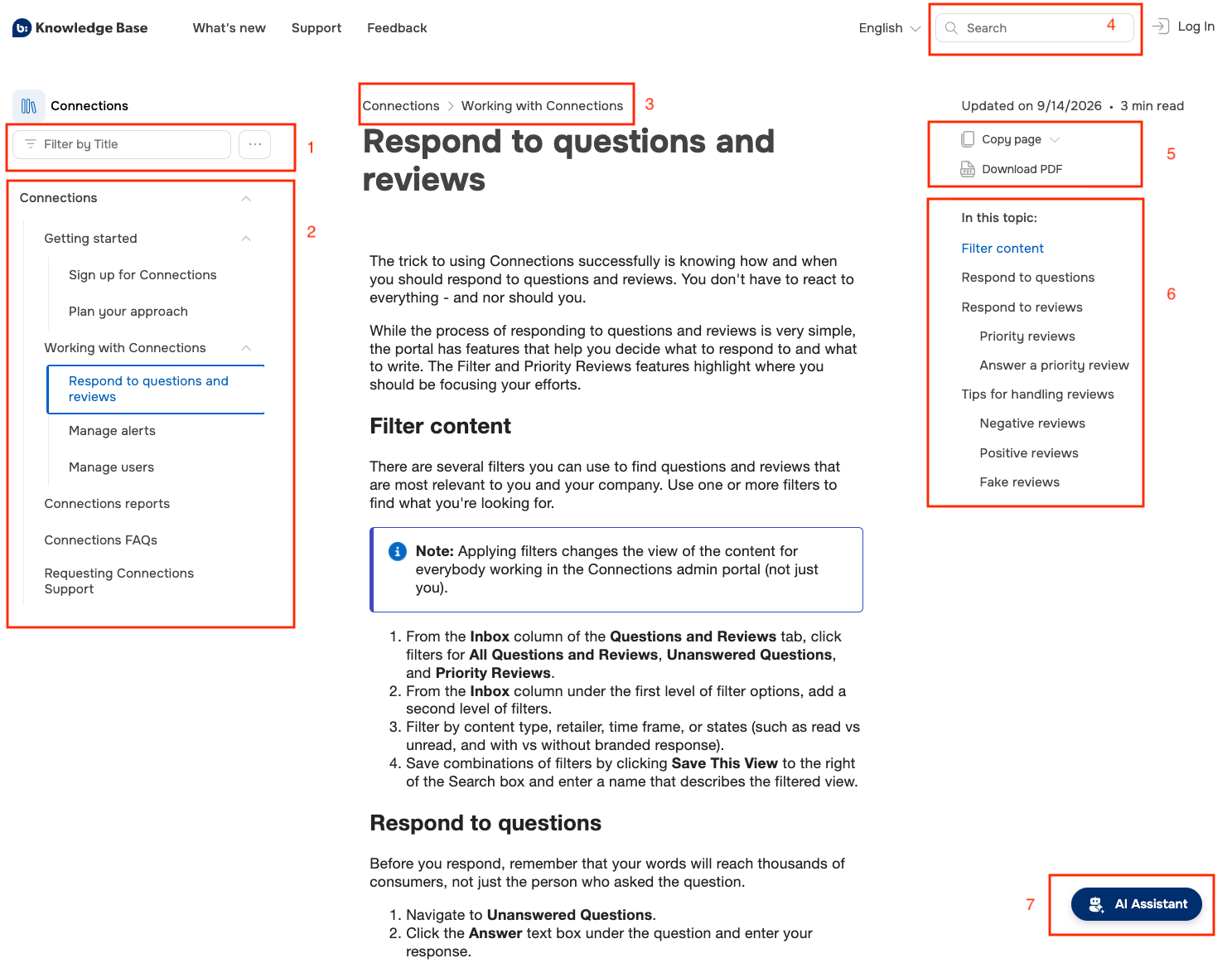
The Bazaarvoice knowledge base is designed to be intuitive and easy to navigate, using a recognizable layout and structure:
|
Area
|
Description
|
|---|---|
|
1
|
Filter for Table of contents. Type a title or keyword to apply the filter to the table of contents. You can also select ... to Expand or Collapse the table of contents.
|
|
2
|
Table of contents. This lists all the articles in the currently displayed publication. You can minimize this panel to increase the topic width.
|
|
3
|
Breadcrumbs. These show the parent article(s) of the current one.
|
|
4
|
Search box. Refer to Using search below.
|
|
5
|
Dropdown to copy page containing:
You can also download a PDF version of the current article.
|
| 6 | Topic changes displays a history of previous versions of the current article. You can view all previous versions, with change highlighted. |
|
7
|
In this topic lists the sections in the current article. Click a heading title to reposition the page.
|
|
8
|
Knowledge Base chatbot (AI Assistant). Refer to AI Assistant below. |
Using search
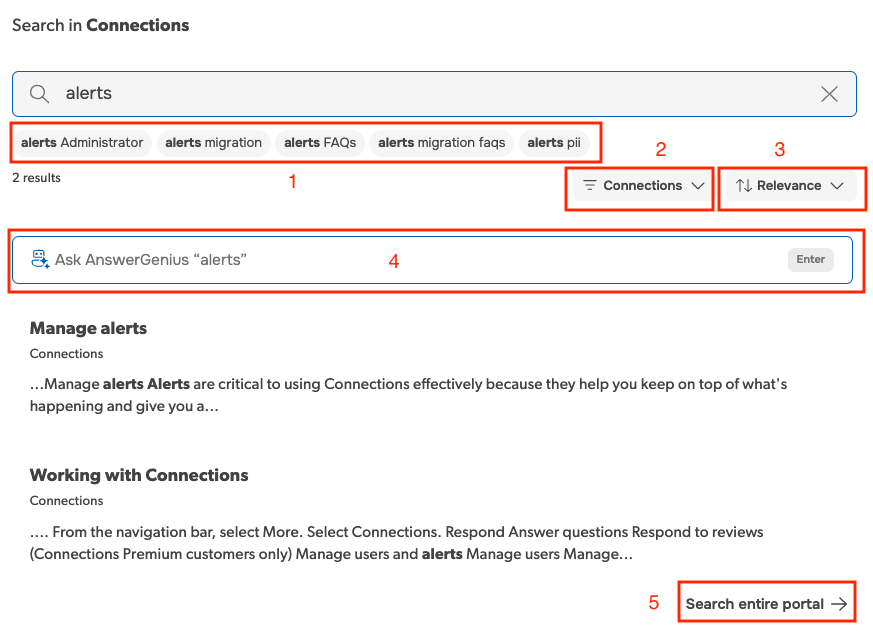
The knowledge base search returns results that contain some or all of the words from your query, and fixes typos and makes assumptions about what you're searching for. As soon as you start typing in the search box, the knowledge base will start searching and display results (predictive search).
- If you start your search from the knowledge base homepage, all product publications are searched by default
- If you start your search from anywhere else (such as a Ratings & Reviews article), only that article's publication is searched by default. You can change the search filter to search all publications if required
|
Area
|
Description
|
|---|---|
|
1
|
Suggested phrases to refine your search.
|
|
2
|
Shows the current publication being searched. Click to change to a different publication. |
|
3
|
Change sorting of search results between Relevance and Updated On.
|
|
4
|
Use the AI assistant for an AI-generated reply or overview to your search term based on content in the Knowledge Base. You can then ask follow-up questions if needed.
|
|
5
|
If you searched a specific product publication, expand the search to the entire Knowledge Base. |
Using search operators
The Bazaarvoice knowledge base supports advanced search operators such as AND and OR. Refer to Full-Text Search: Supported Search Operators.
AI Assistant
The Bazaarvoice Knowledge Base has an AI assistant on the bottom-right of every topic and within the search window. This chatbot (also known as AnswerAssistant) is an intelligent digital assistant that understands natural language (it can look for answers by meaning as well as by keywords). The AI Assistant provides direct links to source articles, improving documentation discoverability and guiding you to the answers you need.

Knowledge Base MCP Server
This Knowledge Base is available to AI agents over the Model Context Protocol (MCP), an open standard for connecting AI assistants to external data sources and tools. Connect your agent once, and you can ask it questions about our products without leaving your own tools — it answers from this documentation rather than from whatever it remembers. To connect:
- View any Knowledge Base article then click the Copy page dropdown on the right
- Select an option from the CONNECT WITH MCP block. You can copy the connection details for a supported agent or the server URL address to configure an agent yourself.
- Paste the copied connection instructions into your AI agent to add docs-bazaarvoice-com. If necessary, your IT department may need to do this for you.
You should then be able to query the Knowledge Base using your connected AI agent.
MCP server rate limits
The Knowledge Base MCP server has per-minute and per-day usage limits. These limits are shared by everyone using the MCP server, so a single reader running an agent heavily can affect others. When a limit is reached, your AI agent is told that there have been too many requests and it should wait before trying again. How your agent reports this to you depends on your particular environment: you may only notice that your agent has become slow to answer or has stopped responding.
Knowledge Base use of language
At Bazaarvoice, the people reading our documentation are part of a diverse audience who have a range of identities and needs. Therefore, when writing content, we always have our readers in the front of our minds. How do they identify? Could the terms we use carry any potentially offensive or negative connotations? What are our readers’ accessibility needs?
We have developed a set of standards around inclusivity and accessibility which our technical communications team adhere to throughout the content creation process for our knowledge base and other documentation.
Inclusivity
-
We use gender-neutral terms where applicable. For example, instead of “Configure this feature to alert the user when he or she receives a new review” we would write "Configure this feature to alert the user when they receive a new review”.
-
We avoid using ableist language as this frames people without disabilities as the norm. It is important not to associate mental health with being functional. For example, we would use the term “sample data” instead of “dummy data”.
-
We avoid using terms which evoke racist connotations. For example, instead of “slave” and “master”, we would use “replica” and “source”.
Accessibility
-
All page titles are short, identify the subject of the page and are descriptive enough that they make sense out of context, for example, by a screen reader or in a list of search results.
-
Headings use heading tags (h1, h2, etc.) and are descriptive to help readers orient themselves.
-
Sentences are structured with the most important information at the start. This assists, for example, screen reader users.
-
Links describe the content of the link target and avoid ambiguous text such as “click here” or “read more”.
-
All images are accompanied by alternative text that provides the information or function of the image.
Reporting a problem with the Knowledge Base
If you discover a problem with the knowledge base, or have a suggestion for improvement please contact the Bazaarvoice technical communication team using the Provide Feedback link at the bottom of every article.
