Talk-to-Text is a user-controlled, start/stop voice input feature that allows consumers to dictate reviews directly into the text area using the speech-to-text (microphone). It provides a flexible alternative to manual typing, streamlines the submission process, and encourages consumers to share longer, more detailed reviews.

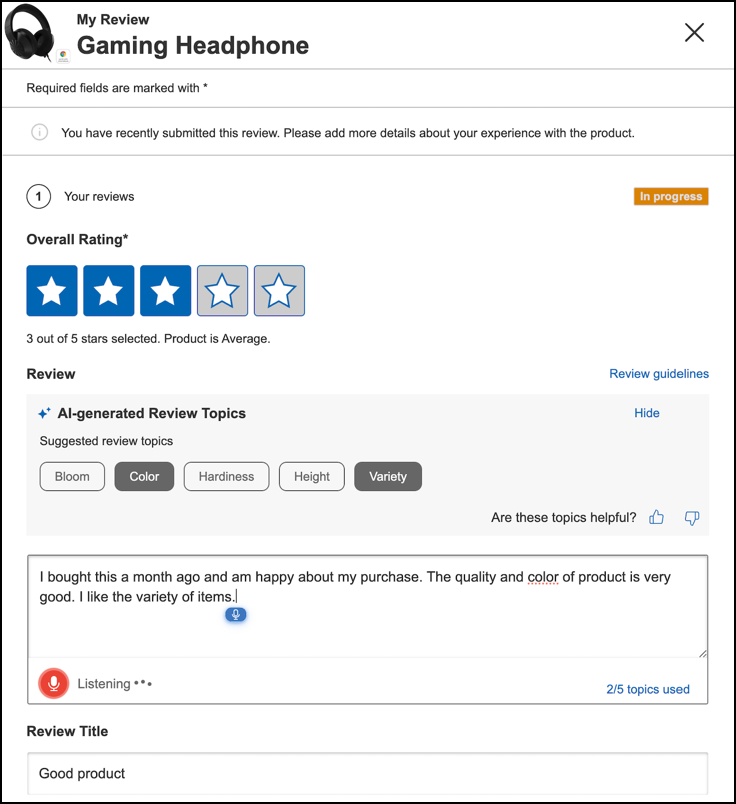
How to use voice transcription
- Select the microphone icon in the Review field.
-
Start speaking when the microphone becomes active and the status indicator shows “Listening”. The system transcribes your speech into text in real time.Note: For Chrome desktop users, the transcription may not always update in real time. The full transcript displays once the consumer stops speaking.
- Select the microphone icon again to stop transcription.
- You can manually edit or add to the transcript, or select the microphone icon again to dictate.
The system will alert you if there is no microphone permission (Microphone access denied) or no speech detected (No audio detected) during the session.
Supported languages and browsers
The Talk-to-Text feature supports the languages listed in the table below. The supported languages and browser combinations may vary based on your specific system configuration.
| Languages | Supported browsers |
|---|---|
| Catalan (ca), Chinese (zh), Croatian (hr), Czech (cs), Danish (da), Dutch (nl), English (en), Finnish (fi), French (fr), German (de), Greek (el), Hungarian (hu), Indonesian (id), Italian (it), Japanese (ja), Korean (ko), Malay (ms), Norwegian (no), Polish (pl), Portuguese (pt), Romanian (ro), Russian (ru), Slovak (sk), Spanish (es), Swedish (sv), Thai (th), Turkish (tr), Ukrainian (uk), Vietnamese (vi) | Google Chrome, Safari, Microsoft Edge |
| Bulgarian (bg), Estonian (et), Latvian (lv), Lithuanian (lt), Serbian (sr), Slovenian (sl) | Google Chrome, Microsoft Edge |
| Albanian (sq), Basque (eu), Icelandic (is) | Google Chrome |
