Authentication is the process of confirming a user's identity, and it provides a way to ensure that legitimate users create content on your site. Through authentication, Bazaarvoice can confirm a user's email address and link the email address to a profile in the Bazaarvoice Network.

The following authentication methods are supported by Ratings & Reviews:
-
Hosted authentication: This is the default authentication method recommended by Bazaarvoice. With hosted authentication, users verify their identity using their email addresses when they click the "Write a review" link on a product page or a submission link in a review request (previously known as post-interaction email or PIE). No additional configuration is required.
-
Site authentication: This method requires users to sign in to your website’s authentication system. Before users can submit product reviews, questions, or answers, they must sign in with the same credentials they used to access your website.
Site authentication significantly decreases—by about 30%—the volume of user submissions. Furthermore, it requires that your technical team perform additional integration work to tie Ratings & Reviews to your website’s login process. Use this method only if you have a legal or business requirement that necessitates that your consumer's sign in to Ratings & Reviews.
To implement site authentication, refer to Site authentication.
Hosted authentication workflow
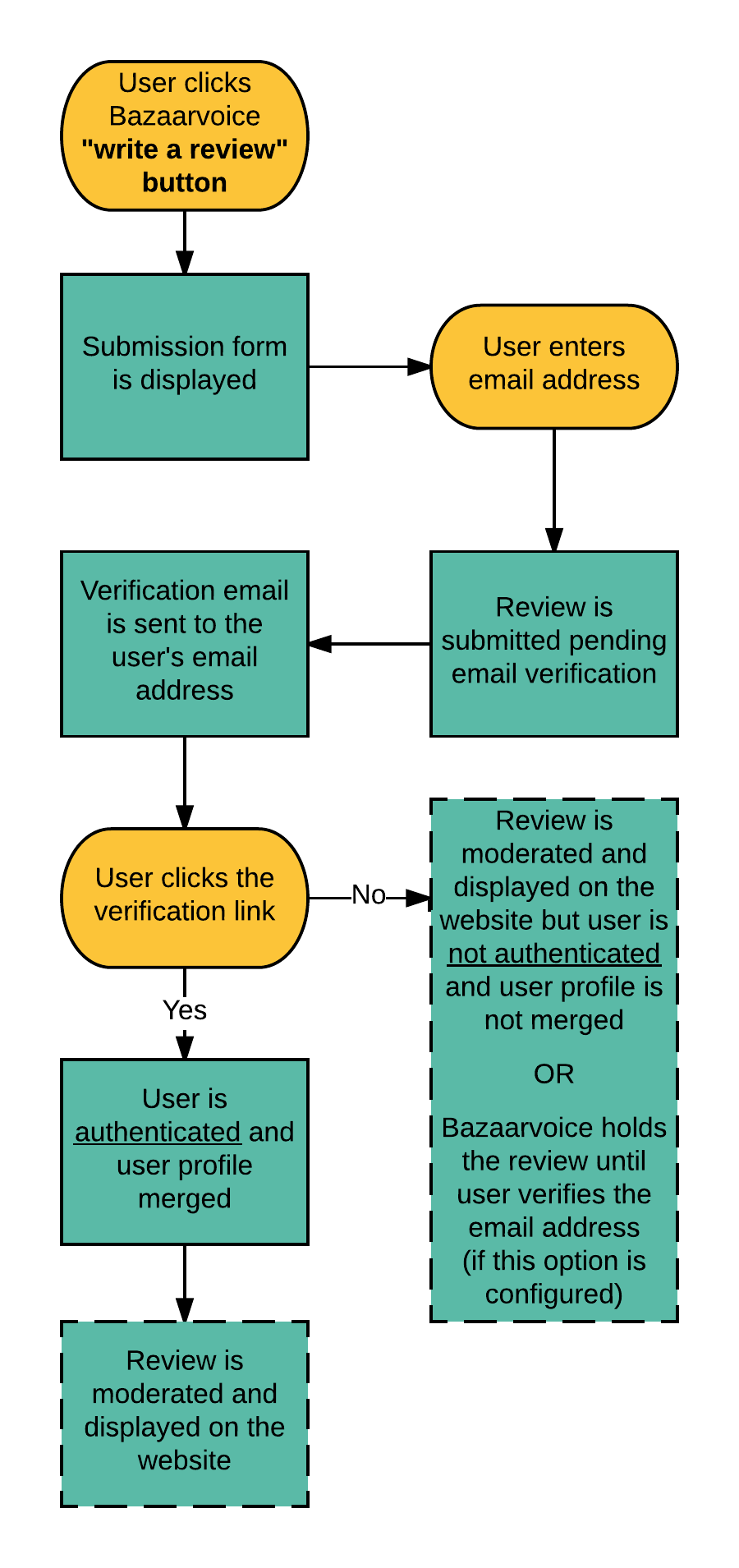
If hosted authentication is used on your site, users are routed directly to the Bazaarvoice container page or product page where they can access the review submission form. Here is the workflow for hosted authentication, depending on how the user begins interaction.
| "Write a review" button on your site | Link in a review request |
|---|---|
 |
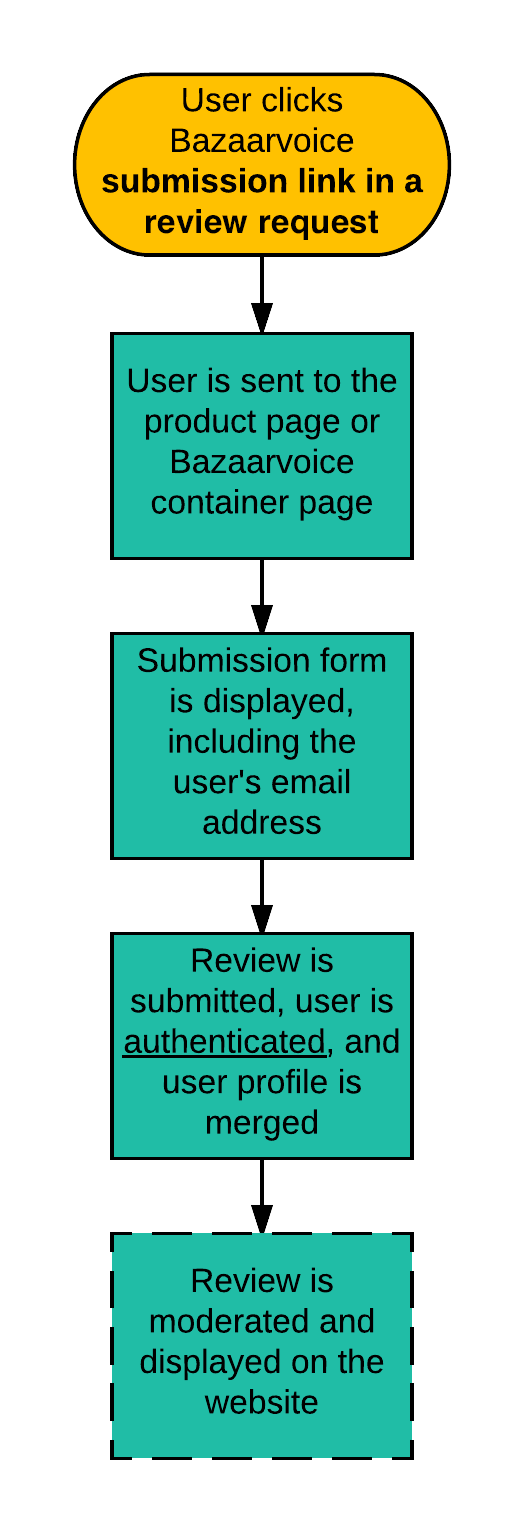 |
After a user clicks the verification link:
-
The user's profile is merged with all other profiles that have the same email address. A profile comprises a user's email address, display name (nickname), location, and content (review, question, answer, and so on). If the user does not have an existing profile, a profile is created and confirmed.
Note: Reviews on your website display the user's most recently chosen display name or nickname. -
The review is moderated and published on your website. If Ratings & Reviews solution holds a review until user verification, the review is published on the website after a user clicks the verification link.
Bazaarvoice moderates user profiles and reviews in two steps during the moderation process:
- Reviews are moderated first and then profiles are moderated.
- Both can be rejected if they do not conform with moderation guidelines.
-
If a review is approved but the profile is rejected, the review is displayed on the website as anonymous.
Review submission tokens
Bazaarvoice uses hosted authentication to manage single reviews per user. This relies on two separate components:
- Review submission token (
bv_authorSubmissionToken): Generated automatically by Bazaarvoice the first time a consumer submits a review, when single review per user and hosted authentication are both enabled. - Browser cookie: Stores the review submission token in the consumer's browser.
The review submission token is distinct from the client-created User Authentication String (UAS). Its expiry depends on the submission method:
| Submission method | API endpoint | Token expiry |
|---|---|---|
| Single submission | submitreview.json |
7 days |
| Progressive submission | initiate.json / progressivesubmission.json |
30 days |
maxage value you set on a client-created UAS. This behavior applies to hosted authentication clients only; site authentication clients manage their own tokens. Refer to Site authentication.
Browser cookie persistence
If you use hosted authentication, ensure the single review per user configuration is enabled to allow the necessary cookie to be stored. Learn about Bazaarvoice cookie consent.
- The cookie is saved only on the browser from which the consumer submitted the review.
- The cookie will not persist when the browser is closed and reopened.
- Cookie name example:
bv_authorSubmissionTokenXXXXXXX
Site authentication workflow
If you choose to enable site authentication, the following is a general overview of the authentication process:
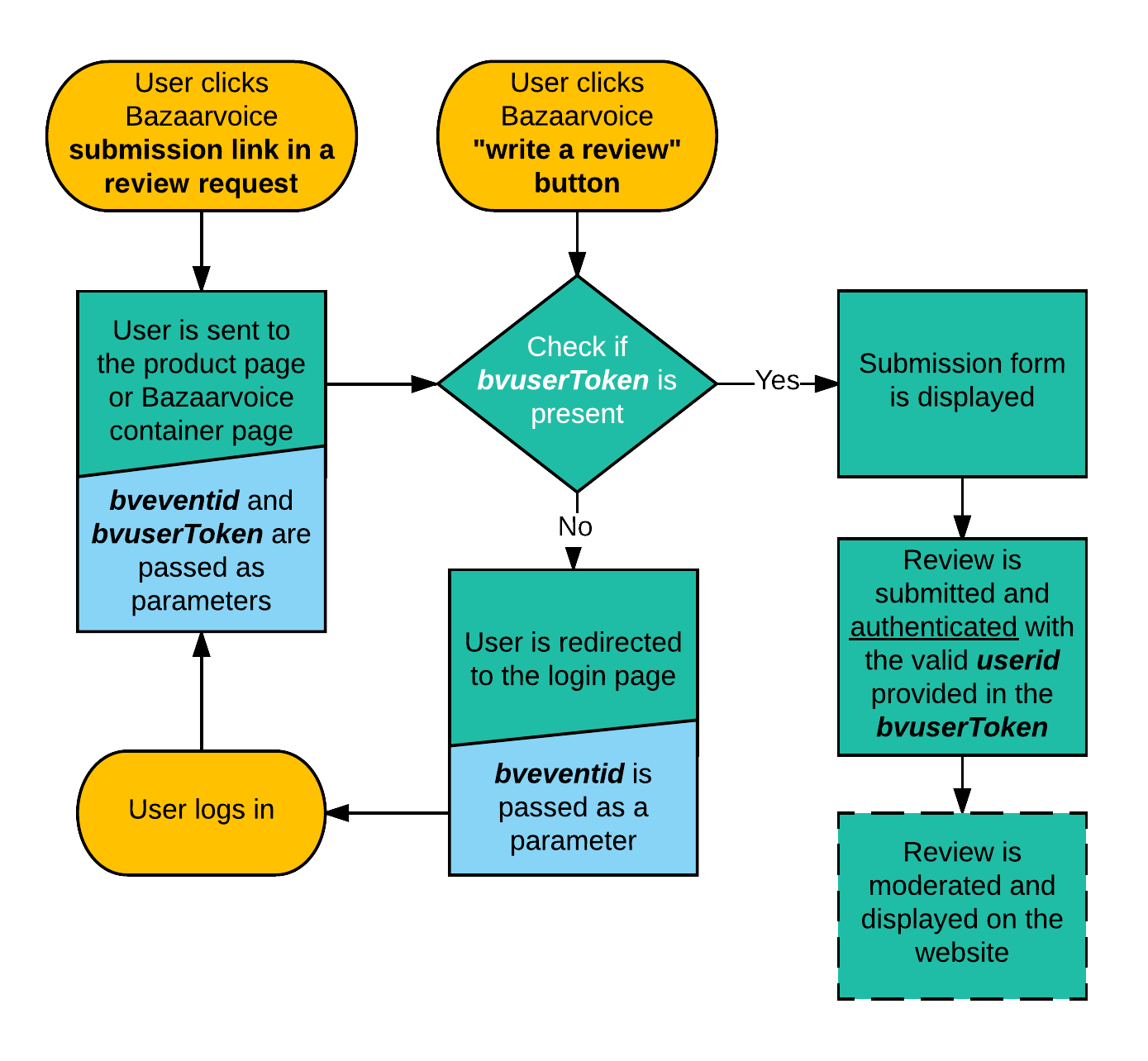
This process relies on the following parameters:
-
bvuserToken— A URL encoded user authentication string (UAS) used when the user is known but not necessarily signed in to the site. The user's ID (userid) is included in the token. -
bveventid—An ID used to ensure that login pages redirect users to your hosted Ratings & Reviews container page. Thebveventidparameter signals that the user was trying to write a review before he was redirected to sign in.
Bazaarvoice moderates user profiles and reviews in two steps during the moderation process. Reviews are moderated first and then profiles are moderated. Both profiles and reviews can be rejected if they do not conform with your moderation guidelines. If a review is approved but the profile is rejected, the review is displayed on the website as anonymous.
Determine your authentication configuration
To determine your authentication configuration, complete these steps:
-
Sign in to the Bazaarvoice Portal
 .
.
-
From the upper-right corner, select the settings icon
 .
.
- Select Configuration.
- Under Implementations, select Edit next to the implementation you want to configure.
- Select User Authentication on the left side of the page under Settings.
-
If the page has a Site Authentication Integration tab at the top, select the tab.
- If Require site authentication is enabled, your implementation uses site authentication.
- If the page has no tabs or Require site authentication is disabled, your implementation uses hosted authentication.

