Learn about Portal roles and what roles you need to complete tasks in different Portal applications.
Roles in the Bazaarvoice Portal

Account Administrator
- Can manage Portal roles and assign them to themselves and other users. Only users who have been assigned the Account Administrator role can assign this role to other users.
- Can hold all Portal roles only after they assign these roles to themselves
- Controls access to PII for users of Reports, Ratings & Reviews, and Questions & Answers
- Administrative privileges apply only to those solutions and instances the Account Administrator can access
- Can create a Answer Contributor ID, which is required to authenticate users responding to questions
- Administrative privileges apply only to users assigned the same set of instances
Alerts Administrator
- Can create, edit, unsubscribe from, and delete any alerts for any user. This includes Ratings & Reviews, Questions & Answers, or Product Feed alerts.
-
Requires the Ratings & Reviews, Questions & Answers, or Product Feed solution for creating alerts
Alerts Contributor
- Can create, view, edit and delete any alerts they own. This includes Ratings & Reviews, Questions & Answers, or Product Feed alerts
- Requires the Ratings & Reviews solution for creating Ratings & Reviews alerts
- Requires the Questions & Answers solution for creating Questions and Answers alerts
- Requires the Product Feed solution and the Catalog Administrator role for creating Product Feed alerts
Alerts Viewer
- Can only view Ratings & Reviews, Questions & Answers, or Product Feed alerts they are a recipient of
- Can unsubscribe from any alerts they are a recipient of
- Cannot create, edit, unsubscribe or delete alerts
Configuration Administrator
- Allows access to site-level configuration settings and selections
- Requires the Configuration solution
Content Administrator
- Can perform all content management tasks in either Ratings & Reviews or Questions & Answers
- Can view and respond to questions or reviews, moderate content, or migrate content
- Requires the Ratings & Reviews or the Questions & Answers solution
Content Moderator
- Can view all content, perform content moderation tasks, mark reviews as featured, and add notes in Ratings & Reviews
- Can view all content, perform content moderation tasks, and add notes in Questions & Answers
- Requires the Ratings & Reviews or the Questions & Answers solution
Content Responder
- Can view all content, response to reviews, and add notes in Ratings & Reviews
- Can view all content, respond to questions, and add notes in Questions & Answers. A contributor ID is required to authenticate contributors responding to consumer questions.
- Used for responding to reviews through the Response API
- Can control user access to staging and production environments
Content Viewer
- Can view all content in Ratings & Reviews but cannot moderate content, respond to reviews, or modify any posts or settings
- Can view all content in Questions & Answers but cannot moderate or respond to content
- Requires the Ratings & Reviews or the Questions & Answers solution
Network Administrator
- Can create product match requests
- Requires the Ratings & Reviews solution
Network Viewer
- Can only view product match requests
- Cannot create product match requests
- Requires the Ratings & Reviews solution
Privacy Manager
- Can manage privacy requests from your site visitors to analyze the data Bazaarvoice collects about them
- Can remove site visitor data from Bazaarvoice systems
- Must be assigned to the Account Administrator before that administrator can assign it to other users
- Can control user access to staging and production environments
Product Catalog Administrator
- Used for the Product Catalog application
- Requires the Ratings & Reviews or Sampling solution
Product Catalog Viewer
- Used for the Product Catalog application
- Requires the Ratings & Reviews solution or Sampling solution
Recipient-only user
* Applies to Alerts and Reports only.
- Assigned an Active status by default to ensure they receive triggered alerts or reports
- Used strictly for alert and report distribution only
- Doesn't have or require Portal sign-in credentials
- Eligible to receive alerts and reports.
Reports Administrator
- Used for Insights and Reports applications
- Requires the Reports solution or Insights solution
- Can create new reports
- Can view and download existing reports
- Can edit and delete reports created by any user within the same client instance
Reports Contributor
- Used for Insights and Reports applications
- Requires the Reports solution or Insights solution
- Can create new reports
- Can view and download existing reports
- Can only edit and delete the individual reports that they themselves created
Reports Viewer
- Used to receive reports
- Can download reports only from the report email
Sampling Campaign Manager
- Used for Sampling and Sampling Administration
- Requires the Sampling solution
- Assigned to users who configure, set up, run, and approve requests for sampling campaigns
Sampling Community Manager
- Used for Sampling and Sampling Administration
- Requires the Sampling solution
- Assigned to users who manage and communicate with members within the sampling community
Sampling Fulfillment Manager
- Used for Sampling and Sampling Administration
- Requires the Sampling solution
- Assigned to users who access and provide fulfillment partners with the information required to execute sampling campaigns
Sampling Member Support
- Used for Sampling and Sampling Administration
- Requires the Sampling solution
- Assigned to users who respond to member support questions and issues
Sampling Program Manager
- Used for Sampling and Sampling Administration
- Requires the Sampling solution
- Assigned to users who need to understand, submit requests for, and report on details and metrics of sampling campaigns
Technical Administrator
- Used for API key requests and transaction monitoring
- Requires the Ratings & Reviews solution
- Gives access to Monitoring Tools in Portal
Technical Contributor
- Used for API key requests
- Requires the Ratings & Reviews solution
User
- Assigned to all Portal users
- Can access assigned instances and solutions
- Role cannot be deleted
- Can view or unsubscribe from any alerts they receive
Roles needed for Portal applications
Some Portal applications require the assignment of application-specific roles.
Select an application to view its required solutions and roles.
API Keys
- Requires the Ratings & Reviews solution
- Requires one of the following roles: Technical Contributor, Technical Administrator, and Account Administrator
Role capabilities
-
Technical Contributors can:
- view apps
- request API keys
-
view and edit keys for a selected client instance
-
Technical Administrators can:
- view apps
- request API keys
- view and edit all API keys
- enable and display API keys
-
Account Administrators can:
- view apps
- request API keys
- view and edit all API keys
- enable and display API keys
- assign the Technical Contributor role to other users
- assign the Technical Administrator role to other users
Configuration
- Requires the Configuration solution.
- Requires one of the following roles: Configuration Administrator and Account Administrator.
Insights
- Requires the Insights solution.
- Requires one of the following roles: Reports Contributor, Reports Administrator, or Account Administrator.
Integrations
- Requires the Ratings & Reviews solution.
- Requires one of the following roles: Client Administrator, Technical Administrator, or Technical Contributor.
Product Catalog
- Requires the Ratings & Reviews or Sampling solution.
- Requires one of the following roles: Product Catalog Viewer, Product Catalog Administrator, Account Administrator, Alerts Viewer, Alerts Administrator, or Alerts Contributor.
Role capabilities
-
Product Catalog Viewers can:
- view products and product details.
- view brands and brand details.
- view categories and category details.
-
view Portal product families and family details.
-
Product Catalog Administrators and Account Administrators can:
- perform all Product Catalog Viewer tasks listed above.
- edit and add products.
- edit and add brands.
- edit and add categories.
- edit and create Portal product families.
-
validate product feeds.
-
Alerts Viewers can:
-
view alerts
-
view alerts
-
Alerts Administrators can:
- create and view alerts.
-
edit, delete, or stop receiving alerts.
-
Alerts Contributors can:
- create and view any alerts.
- edit, delete, or stop receiving their own alerts.
Questions & Answers
- Requires the Questions & Answers solution.
- Requires one of the following roles: Content Viewer, Content Responder, Content Moderator, Content Administrator, Account Administrator, Alerts Administrator, Alerts Contributor, or Alerts Viewer
Role capabilities
-
Content Viewers can:
-
view content
-
view content
-
Content Responders can:
- view content
-
respond to questions
-
Content Moderators can:
- view content
-
moderate content
-
Content Administrators can:
- view content
- respond to questions
- mark reviews as Featured
- moderate content
-
migrate content
-
Alerts Viewers can:
- View alerts for migrated users
- Only access the Portal homepage and Manage Alerts.
-
Alerts Contributors can:
-
create, view, edit, or delete their own alerts only
-
create, view, edit, or delete their own alerts only
-
Alerts Administrators can:
- create, view, edit, or delete any alerts.
Ratings & Reviews
- Requires the Ratings & Reviews solution
- Requires one of the following roles: Content Viewer, Content Responder, Content Moderator, Content Administrator, Account Administrator, Alerts Administrator, Alerts Contributor, or Alerts Viewer
Role capabilities
-
Content Viewers can:
-
view content
-
view content
-
Content Responders can:
- view content
-
respond to reviews
-
Content Moderators can:
- view content
-
moderate content
-
Content Administrators can:
- view content
- respond to reviews
- mark reviews as Featured
- moderate content
-
migrate content
-
Alerts Viewers can:
- View alerts for migrated users.
- Only access the Portal homepage and Manage Alerts.
-
Alerts Contributors can:
-
create, view, edit, or delete their own alerts only
-
create, view, edit, or delete their own alerts only
-
Alerts Administrators can:
- create, view, edit, or delete any alerts.
Reports
- Requires the Reports solution, except for the Reports Viewer role.
- Requires one of the following roles: Reports Contributor, Reports Administrator, Account Administrator, or Reports Viewer
Role capabilities
-
Reports Contributors can:
- create and view reports.
- duplicate and download reports.
-
edit or delete their own reports only.
-
Reports Administrators and Account Administrators can:
- create, view, duplicate, and download reports.
-
edit or delete any reports in the instance.
-
Reports Viewers can:
- download reports only from the report email.
Sampling
- Requires the Sampling solution.
- Requires one of the following roles: Sampling Campaign Manager, Sampling Community Manager, Sampling Fulfillment Manager, Sampling Member Support, Sampling Program Manager, or Account Administrator
Role capabilities
-
Sampling Campaign Managers can:
- view dashboards, products, reviews, retailers, and nominated products
- add products
- view and edit fulfillment
- view campaigns
- view vendors
-
send emails
-
Sampling Community Managers can:
- view dashboards, products, reviews, and retailers
- view fulfillment
- view campaigns
- view and edit members
- view and edit vendors
-
send emails
-
Sampling Fulfillment Managers can:
-
view fulfillment
-
view fulfillment
-
Sampling Member Support can:
- view dashboards, products, reviews, retailers, and nominated products
- view and edit fulfillment
- view and edit campaigns
- view members
-
Sampling Program Managers can:
- view dashboards, products, reviews, retailers, and nominated products
- add products
- view and edit fulfillment
-
Account Administrators can:
- view dashboards, products, reviews, retailers, and nominated products
- add products
- view and edit fulfillment
- view and edit campaigns
- view and edit members
- view and edit vendors
- send emails
Sampling Administration
- Requires the Sampling solution.
- Requires one of the following roles: Sampling Campaign Manager, Sampling Community Manager, Sampling Member Support, or Account Administrator
Role capabilities
-
Sampling Campaign Managers can:
- view campaigns
- view vendors
- send emails
-
view and edit member surveys
-
Sampling Community Managers can:
- view and edit members
- view and edit vendors
- send emails
-
view and edit member surveys
-
Sampling Member Support can:
- view and edit campaigns
-
view members
-
Account Administrators can:
- view and edit campaigns
- view and edit members
- view and edit vendors
- send emails
- view and edit member surveys
Transactions
- Requires the Ratings & Reviews solution.
- Requires one of the following roles: Technical Administrator, Account Administrator, or Client Administrator
Solutions and corresponding roles
Use the following table to see what roles are available for each solution in Portal.
| Solution | Roles |
|---|---|
| Configuration |
|
| Network |
|
| Privacy |
|
|
Product Catalog |
|
| Questions & Answers and Ratings & Reviews |
|
|
Reports & Analytics |
|
|
Sampling |
|
| Sampling Administration |
|
| Other roles not tied to a specific solution |
Note: Account Administrators can assign any of the solutions they can access to other users in their instance. They can also assign roles for these solutions to other users even if they don’t have these roles themselves.
|
Assign contributor ID to user
* This step is required for the Questions & Answers solution only.
- A contributor ID with associated badges can be assigned to multiple users. For example, if Maggie Smith and James Lee are part of your Questions & Answers support team, you can assign the same contributor ID to both users.
- To link a user to an Answer Contributor ID for authentication, you must have the Account Administrator role.
- When a user responds to a question, any badges (Staff, Expert, or Merit) linked to the assigned contributor ID will automatically appear on your site.
-
Sign in to the Bazaarvoice Portal
 .
.
-
From the upper-right corner, select the settings icon
 .
.
-
Select Manage Users. Use the Filters area of the Manage users page to locate the user and edit their account details. The Edit user page appears.
-
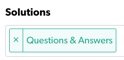
Under Solutions, select Questions & Answers as a solution available to a user.
-
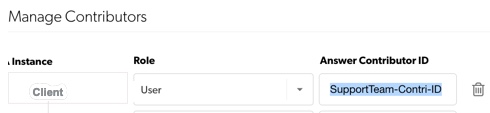
Once Questions & Answers is selected, a section labelled Manage Contributors becomes active.
-
Enter the Answer Contributor ID for each Instance.

-
(Optional) To delete an Answer Contributor ID for a specific client instance, use the trash can icon.
-
Select Save.
