The Private Brand feature enables retailers to prioritize their own brand over national brands while collecting user-generated content (UGC) through Review Requests (emails or messages). This helps increase review volume and visibility for strategic, high-margin, or less-reviewed products. It also strengthens consumer trust, provides valuable customer insights, and boosts conversion rates for products that are typically harder to generate reviews for.

Required solutions and roles
You must have:
| Solution | Roles |
|---|---|
|
|

Enable and configure Private Brand
Complete the following steps to enable and configure Private Brand:
-
Sign in to the Bazaarvoice Portal.
- From the navigation bar, select More > Product Catalog. The product list appears.
- Select the Brands tab to see all the brands in your catalog.
- To add a brand to your product catalog:
- Select Add brand on the Brands list page. The Add brand page appears.
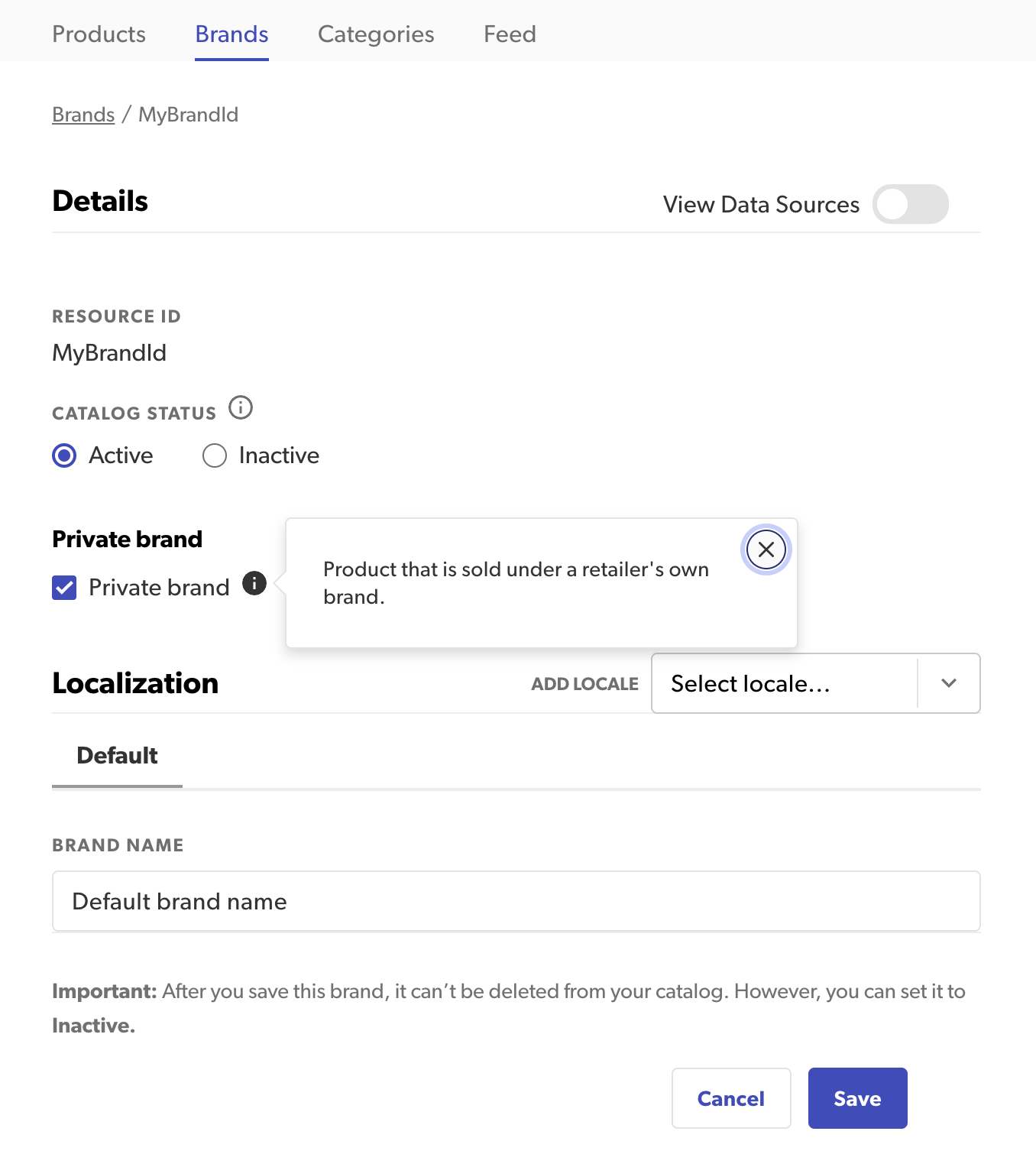
- Enter values to define your brand:
- Brand name—Enter a unique name of no more than 255 characters. The name is required and cannot contain HTML characters.
- Brand ID—Use the auto-generated ID, or de-select this option to enter your own unique value.
- Catalog status—Select Active or Inactive to set the status of the brand in your catalog.
- Private brand — Select this checkbox if the product is sold under a retailer's own brand. Enabling this prioritizes the brand in Review Request Emails (RRE). This feature is only available to Enterprise clients.
-
Select Save to create the brand. To learn more about the Catalog application, refer to Product Catalog in Portal.
-
In the Portal, from the upper-right corner, select the Settings icon.
-
Select Configuration.
-
Under Implementations, select Edit next to the implementation you want to configure.
Note: Email templates are used in the deployment zone to which the implementation is published. Changes made to templates in one zone affect email messages sent from that zone only. -
Under the Collect Reviews section, select Configure Messages.
-
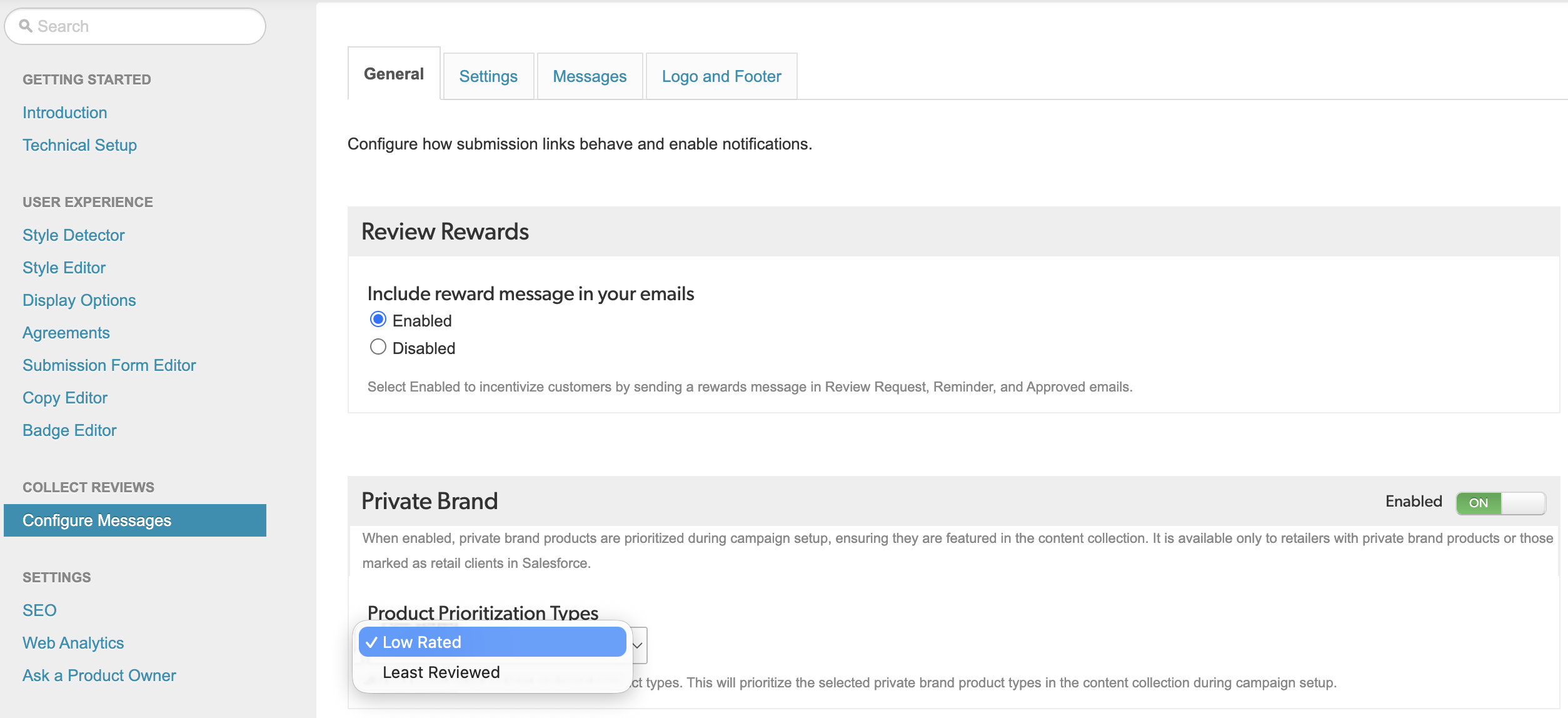
Select the General tab and enable Private Brand.
-
Low Rated – Select this to highlight products with low ratings (negative sentiment) by moving them to the top of the review request email or message.
-
Least Reviewed (default) – Select this to highlight products with the fewest reviews by moving them to the top of the review request email or message.
-
Edit brand type
To edit a brand, select it from the brands list (Step 3).
- To change the brand type, select or unselect the Private brand checkbox. Select this checkbox only if the product is sold under a retailer's own brand.
- Select Save to save changes to the brand and return to the brands list.Note: To learn more about editing brands, refer to Edit brands.
How it works
The default product prioritization for review request emails or messages follows this order:
-
Highest-priced item
-
Item with the fewest reviews
-
Next highest-priced item
-
Next item with the fewest reviews
-
Next highest-priced item
When Private Brand is enabled, private brand products will override this existing prioritization strategy. Based on your selection—either low rated or least reviewed—these products will be listed first in review requests, followed by national brand products. This ensures that private brand products receive enhanced visibility.
Example:
Assume the following product data:
|
Product |
Category |
Price (USD) |
Ratings |
No. of reviews |
|---|---|---|---|---|
|
Air fryer |
Private brand |
100 |
3.0 |
10 |
|
Blender |
Private brand |
70 |
2.5 |
1 |
|
Coffee maker |
Private brand |
50 |
4.0 |
3 |
|
Dryer |
Private brand |
20 |
1.0 |
20 |
|
Electric kettle |
National brand |
15 |
0.0 |
16 |
|
Flat iron |
National brand |
65 |
2.7 |
21 |
|
Garden sprinkler |
National brand |
55 |
3.8 |
14 |
Scenario 1: Low Rated
Private brand products with lower ratings are prioritized first, followed by national brand products, as shown below:
-
Dryer (1.0)
-
Blender (2.5)
-
Air fryer (3.0)
-
Coffee maker (4.0)
-
Flat iron (USD 65)
-
Garden sprinkler (14 reviews)
-
Electric kettle (USD 15)
Scenario 2: Least Reviewed
Private brand products with the fewest reviews are prioritized first, followed by national brand products, as shown below:
-
Blender (1 review)
-
Coffee maker (3 reviews)
-
Air fryer (10 reviews)
-
Dryer (20 reviews)
-
Flat iron (USD 65)
-
Garden sprinkler (14 reviews)
-
Electric kettle (USD 15)
Common questions
Expand the following drop downs for answers to common questions about Private Brand feature.
Is any development work required on our end?
No. There is no engineering or technical work needed from your side, Bazaarvoice will handle all configurations.
Will this affect how consumers see the review request email (RRE)?
No. The consumer experience remains unchanged since the email template stays the same. Only the prioritization logic changes the order of products, with your private brands displayed first, followed by national brands.
How do you ensure private brand prioritization does not affect our national brand relationships?
The goal is to strategically enhance review collection for your private brands, especially where coverage is low or engagement is needed, without excluding national brands. All purchased products still appear in review request emails (RREs); prioritization simply adjusts their order. We recommend using this feature selectively to boost private brand performance while keeping a balanced UGC strategy.
Will prioritizing low-rated products harm our brand perception?
No. The goal of prioritizing low-rated products is to gather more balanced and authentic feedback. These products often need additional reviews to better reflect the customer experience, which can actually enhance consumer trust and provide valuable insights for product teams to improve.
Is there any risk that this might confuse consumers receiving the RRE?
No. The prioritization only adjusts the order of products; the email's content and structure remain unchanged.
Can we test both prioritization strategies (Low Rated vs. Least Reviewed)?
No. It supports one strategy per client instance to keep implementation simple.
