Inline campaigns are informational notes that are embedded directly into your application's existing user interface. Unlike pop-ups or overlays, these views reside within your page layout. Initially, they are hidden and have a height of 0 px. When a campaign is triggered, the view expands with an animation to reveal the content, which typically includes a headline and message. The following image shows an example inline campaign.
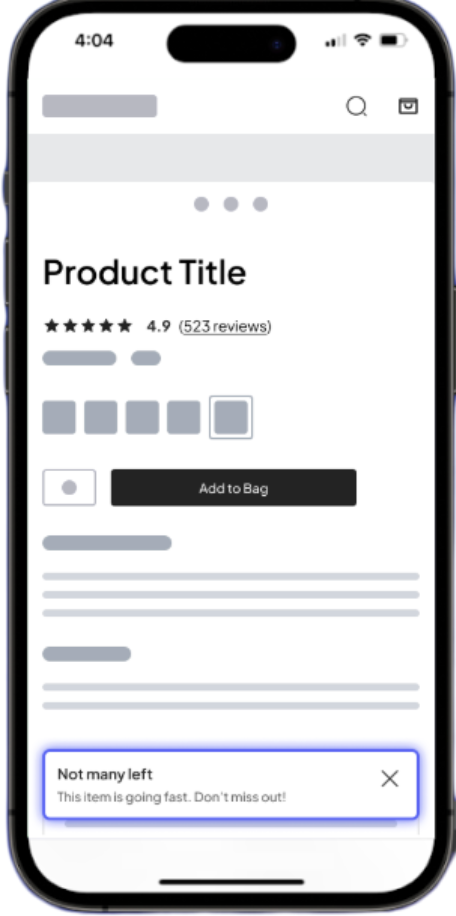

Note: The steps in this article apply only to Android Views. For Jetpack Compose inline campaigns, refer to the Jetpack Compose implementation topic.
How inline campaigns work
After adding GranifyInlineView to your layout and implementing the expand and collapse handlers, the SDK handles the lifecycle automatically:
-
Discovery: When you call
Granify.trackPageView(...), the SDK scans the current activity to identify all availableGranifyInlineViewlocations. - Matching: If the server matches the shopper to a campaign, it instructs the SDK to activate the specific targeted view.
-
Expansion: The SDK initializes the content and animates the view, triggering the
expandHandler(orcollapseHandler) on each frame to update your layout dynamically. -
Persistence: If a user navigates away from the page, the inline preserves its state and is prepared for redisplay if the user returns.
Topics in this section
Select a topic to begin your integration:
|
Topics
|
Description
|
|---|---|
|
Steps to implement inline campaigns using XML layouts and handlers.
|
|
|
Describes how to validate your integration and troubleshoot layout issues.
|