Display (V2) Multi-Product Submission Listing page
You can configure these styles using Style Editor in the Bazaarvoice Portal:
-
Sign in to the Bazaarvoice Portal.
-
From the upper-right corner, select the settings icon.
-
Under Configuration, select Ratings & Reviews.
-
Under Implementations, select Edit next to the implementation you want to configure.
-
Select Style Editor in the User Experience section on the left.
Fonts
Select Fonts to update the font styles. Example: Fonts > Section Header.
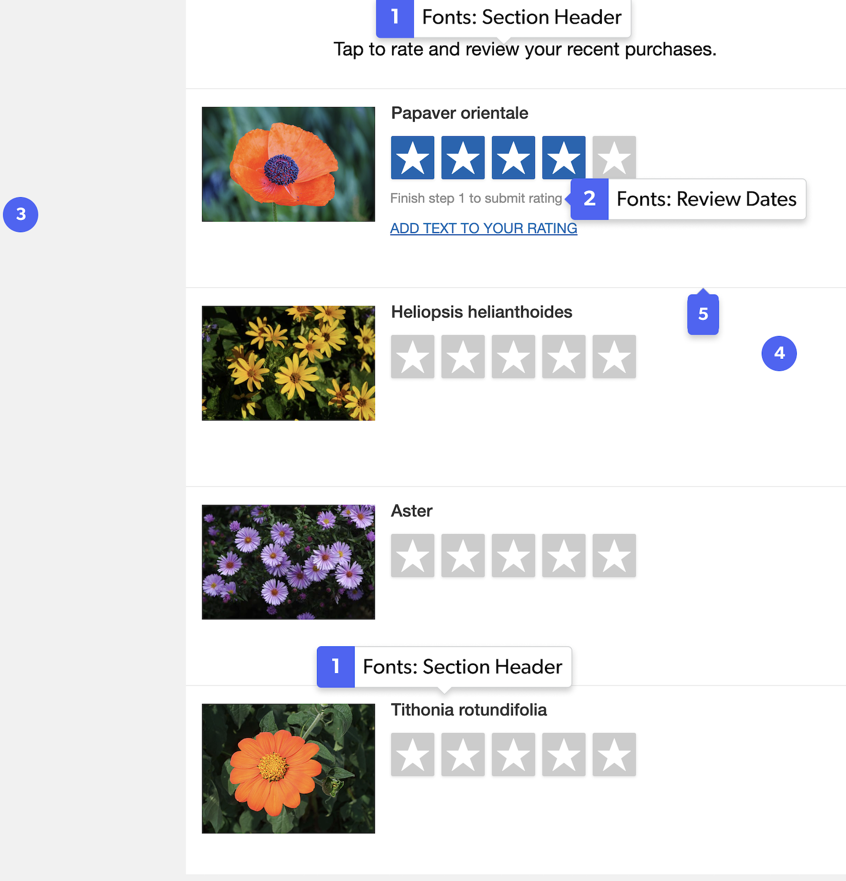
1. Section Header
2. Review Dates
Backgrounds
Select Backgrounds to update the background styles. Example: Backgrounds > Section Header Controls.
3. Section Header Controls
4. Lightbox
Borders
Select Fonts to update the border styles. Example: Fonts > Review Dates.
5. Fonts: Review Dates
|
|
