Display (V2) Multi-Product Submission
You can configure these styles using Style Editor in the Bazaarvoice Portal:
-
Sign in to the Bazaarvoice Portal.
-
From the upper-right corner, select the settings icon.
-
Under Configuration, select Ratings & Reviews.
-
Under Implementations, select Edit next to the implementation you want to configure.
-
Select Style Editor in the User Experience section on the left.
Icons
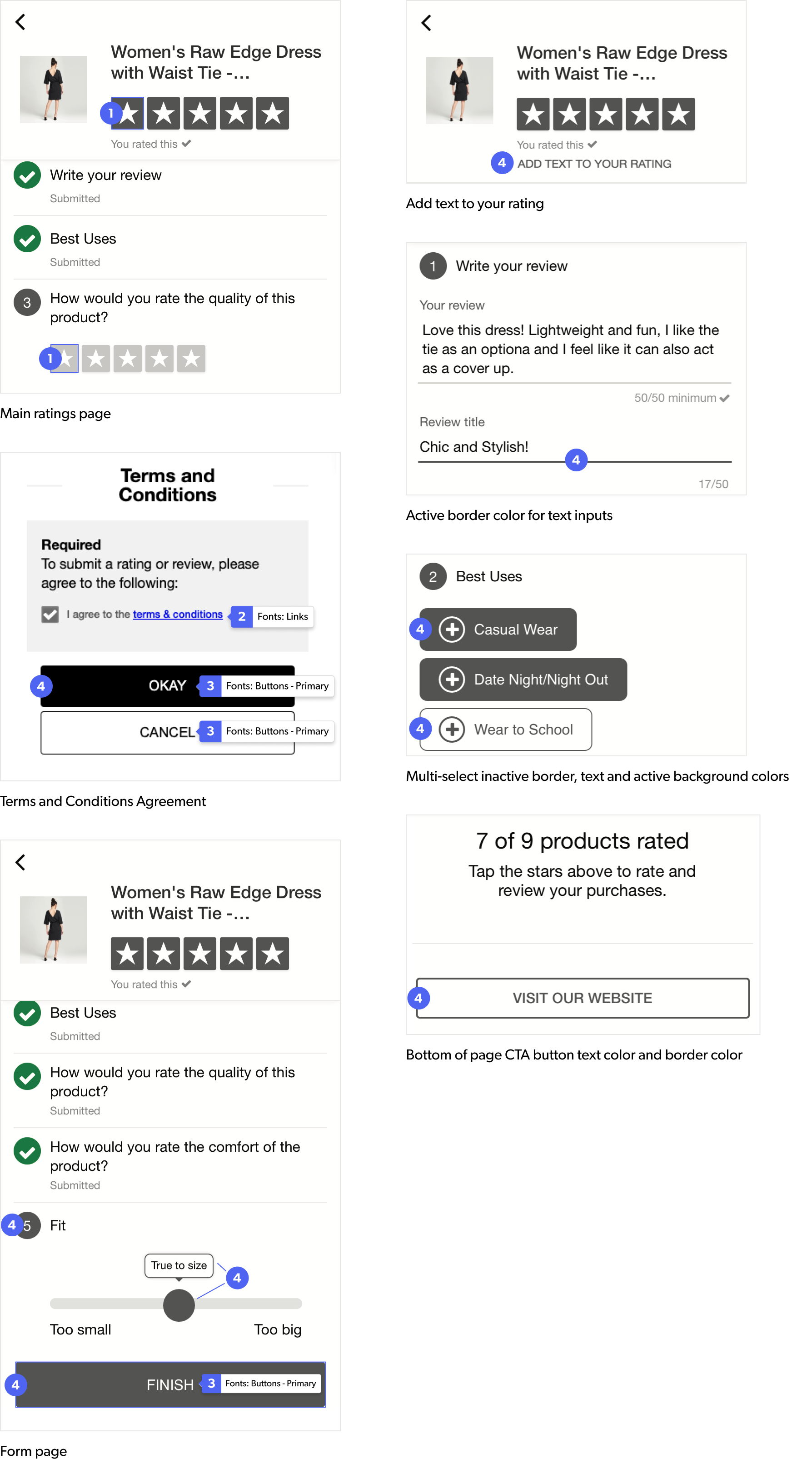
1. Review Stars
- Full: The full star fill color, used for both product ratings and secondary ratings, is measured against the app background of #FFF (white).
- Empty: The star empty color is measured against the star fill and app background colors.
Fonts
2. Links
Link color is measured against the app background color.
3. Buttons - Primary
This color is used for the text color for the buttons on the form, such as the “Finish” button shown at right.
Backgrounds
4. Buttons - Primary
This color is used for:
- The background of the OK button as well as the border and font color of the Cancel button.
- The active question number color.
- The Slider handle as well as the tooltip border.
- The CTA button backgrounds.
- The text color for the message to either add text to your rating or to finish editing.
- The active border color for text inputs.
It is more importantly used as the brand color, so most styles default to whatever is provided in this field. This includes the other question types, such as the single and multi-select.
|
|
