Display (V2) Product Picker
You can configure these styles using Style Editor in the Bazaarvoice Portal:
-
Sign in to the Bazaarvoice Portal.
-
From the upper-right corner, select the settings icon.
-
Under Configuration, select Ratings & Reviews.
-
Under Implementations, select Edit next to the implementation you want to configure.
-
Select Style Editor in the User Experience section on the left.
Fonts
Select Fonts to update the font styles. Example: Fonts > Review Text.
1. Review Text
2. Links
3. Labels
4. Review Highlights > Review Title
Icons
Select Icons to update the icon styles. Example: Icons > Review Stars > Full.
5. Review Stars
- ‘Full’ color changes outlines and fill of full submission stars.
- ‘Empty’ color affects empty star backgrounds in submission stars.
Any changes outside of the list above cannot be done.
|
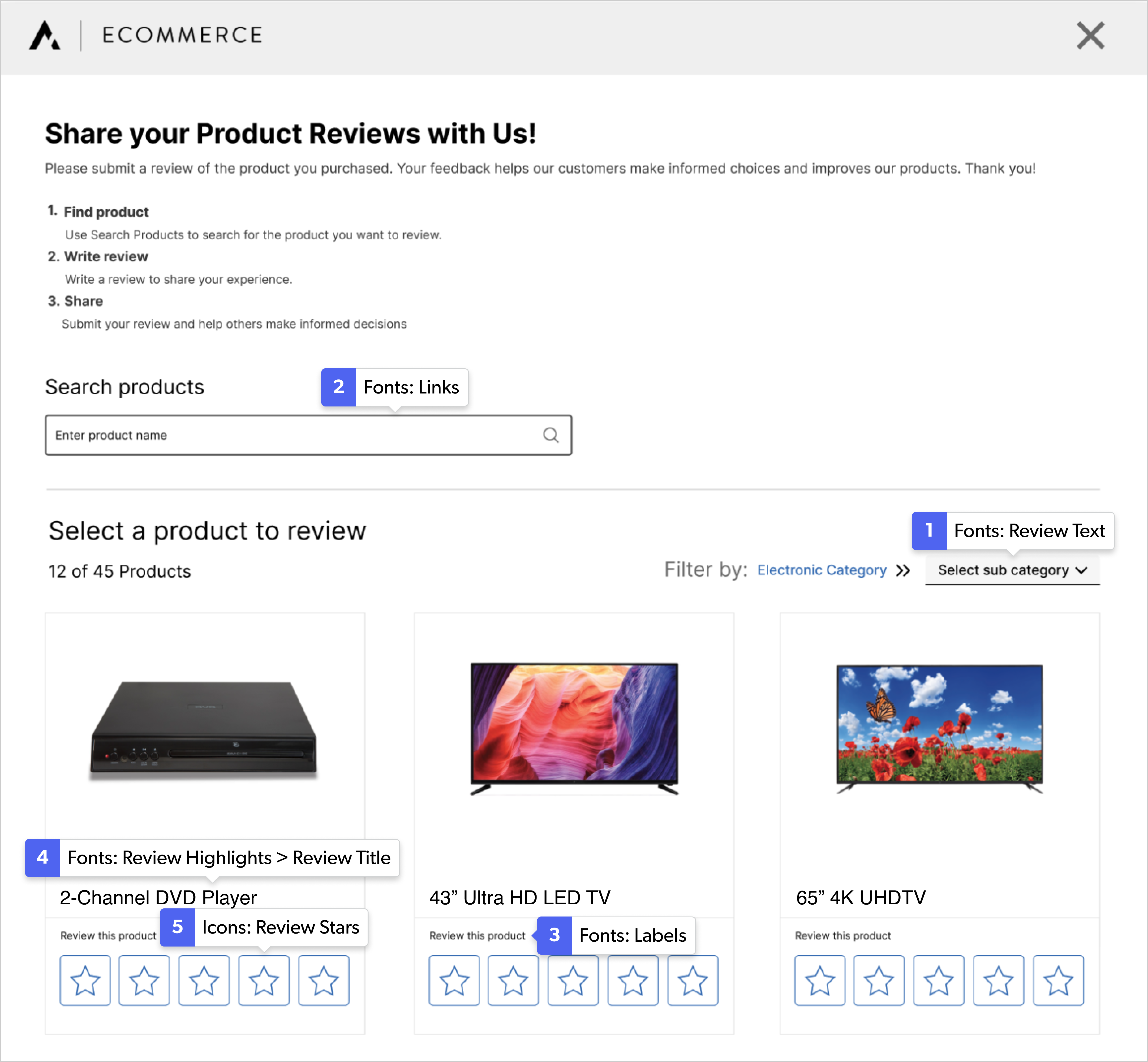
Product picker example
|
