Display (V2) Review Highlights

You can configure these styles using Style Editor in the Bazaarvoice Portal:
  1. Sign in to the Bazaarvoice Portal.
  2. From the upper-right corner, select the settings icon.
  3. Under Configuration, select Ratings & Reviews.
  4. Under Implementations, select Edit next to the implementation you want to configure.
  5. Select Style Editor in the User Experience section on the left.
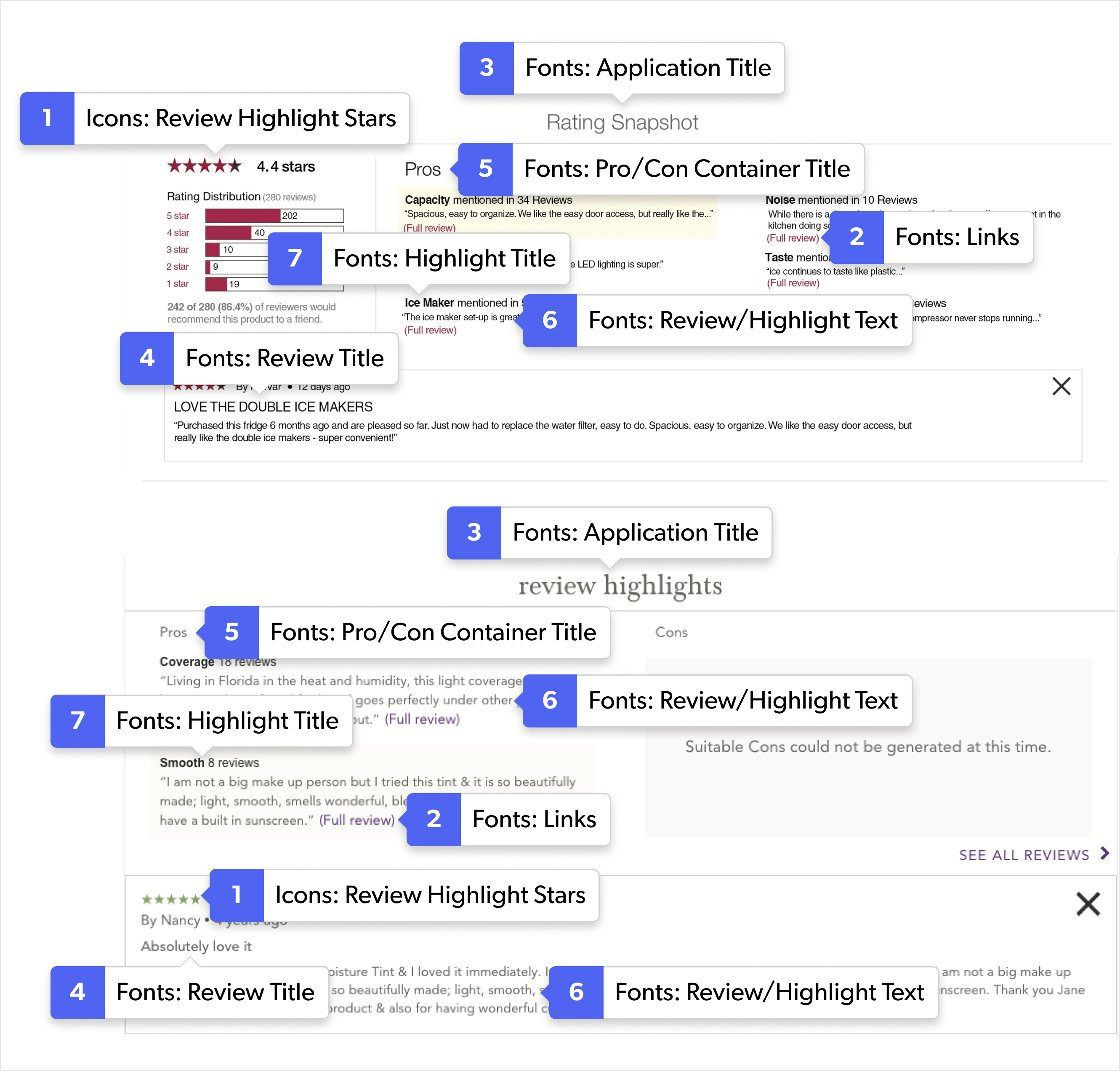
Icons

Select Icons to update the icon styles. Example: Icons > Review Highlight Stars.

1. Review Highlight Stars

Fonts

Select Fonts to update the font styles. Example: Fonts > Links > All.

2. Links

3. Application Title

4. Review Title

5. Pro/Con Container Title

6. Review/Highlight Text

7. Highlight Title

Review Highlights example with numbered callouts identifying configurable interface elements.

Review Highlights example

Provide feedback button
