Display (V2) Review Submission
You can configure these styles using Style Editor in the Bazaarvoice Portal:
-
Sign in to the Bazaarvoice Portal.
-
From the upper-right corner, select the settings icon.
-
Under Configuration, select Ratings & Reviews.
-
Under Implementations, select Edit next to the implementation you want to configure.
-
Select Style Editor in the User Experience section on the left.
Fonts
Select Fonts to update the following styles. Example: Fonts > Form Fieldset Label.
1. Form Fieldset Label
2. Section Header
3. Section Header Controls
4. Review Text
5. Labels
6. Dimension Values
The default setting has a transparent background, with the font and border color being the same as the applied color. When a pill is selected, the background takes on the applied color while the font color changes to Buttons – Primary color.
7. Links
Outline of the focused inputs use the Links color.
8. Buttons - Primary
9. Field Placeholder Text
Affects all text inputs that are filled in.
10. Input Text Placeholder
11. Validation - Error
Error messages below inputs, error text, icon color and size and error field title and input border colors are modified by this setting.
Icons
Select Icons to update the following styles. Example: Icons > Review Stars.
12. Review Stars
- ‘Full’ color changes outlines and fill of full submission stars.
- ‘Empty’ color affects empty star backgrounds in submission stars.
Backgrounds
Select Backgrounds to update the following styles. Example: Backgrounds > Lightbox.
13. Lightbox
14. Buttons - Primary
15. Input Text Background
Borders
Select Borders to update the following styles. Example: Borders > Input Fields.
16. Input Fields
17. Fonts: Review Dates
Lightbox modal and the product image border use �Fonts: Review Dates color to set the border color.
Fonts/Backgrounds/Borders
18. Agreements Checkbox
- Unfilled border: Fonts > Review Text
- Filled background: Backgrounds > Buttons - Primary
- Filled check color: Fonts > Buttons - Primary
Any changes outside of the list above cannot be done.
|
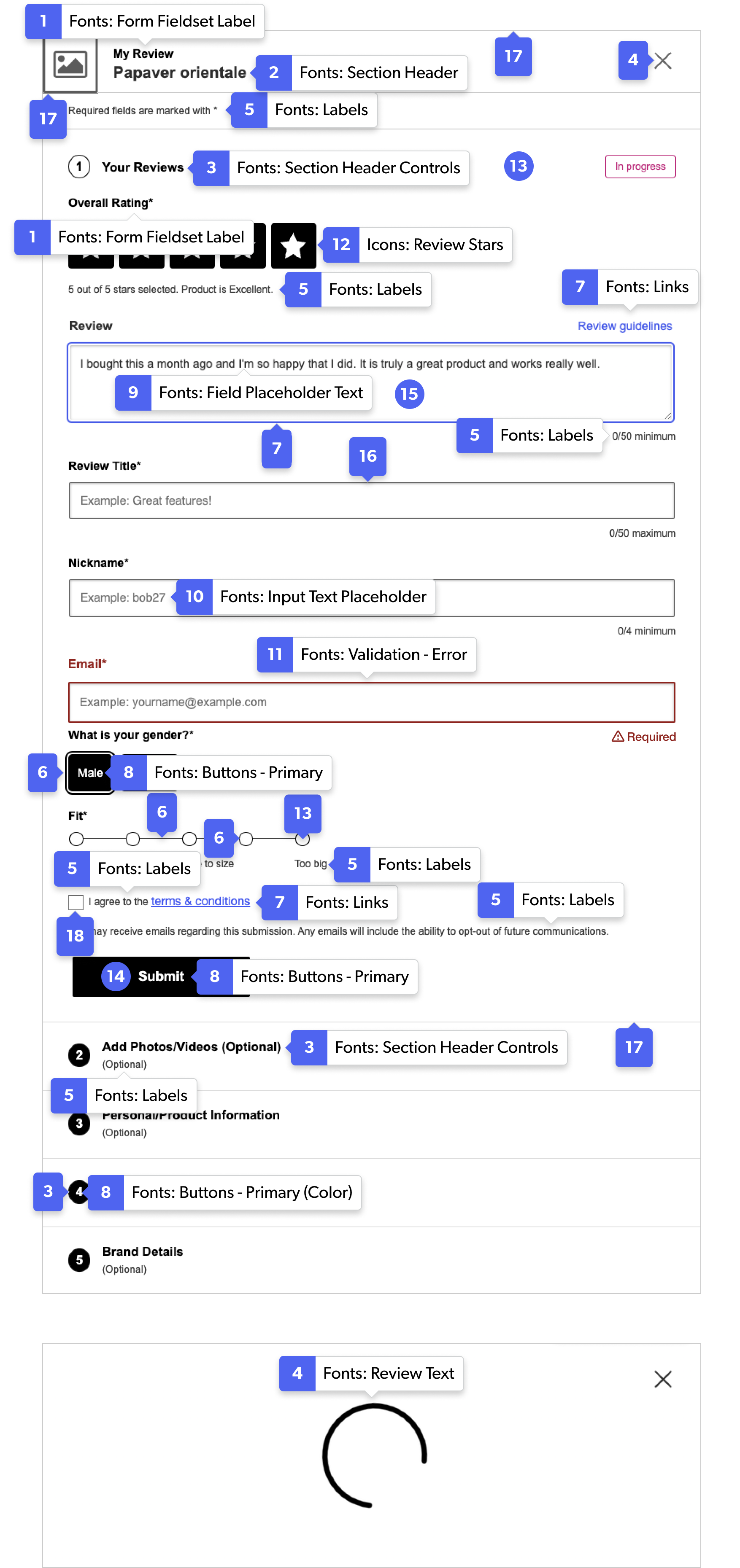
Review submission form example
|
