Bazaarvoice Displayable Content Export (DCE) is a bulk-downloadable file of your approved, public-facing customer reviews stripped of personal data. You can use this file to host and display the content directly on your website. This means you can store UGC locally and display the content without calling the Bazaarvoice Ratings & Reviews display infrastructure. You may want to use DCE for performance, flexibility, or security reasons.

Benefits of DCE
DCE offers the following benefits:
- A service optimized for downloading displayable content in bulk
- A single source of displayable native and syndicated UGC from the Bazaarvoice Network, which does not include personally identifiable information (PII)
- Independence from the Bazaarvoice real-time display (API and hosted display)
- Identification of configurable elements, such as ratings dimensions
- Data normalization to facilitate transmission and import into a relational database
DCE comprises normalized content, including native content and syndicated content, configuration data, and product data. DCE does not include the following content:
- Pending UGC
- Rejected UGC
- Approved UGC that was not syndicated due to other reasons (such as content codes)
How to use DCE
To obtain and import DCE, you must use the DCE HTTPS interface  to securely request and transfer the manifest and content files. DCE provides content in a machine-readable format (JSON), which you will use in an application that you must build, host, and maintain. Your team should have the following proficiencies:
- Web application development
- Client/server interaction based on the HTTPS protocol
- The ability to process JSON
- Data storage, retrieval, and manipulation
Workflow
The following diagram illustrates the contents of DCE and how to import and display the content:
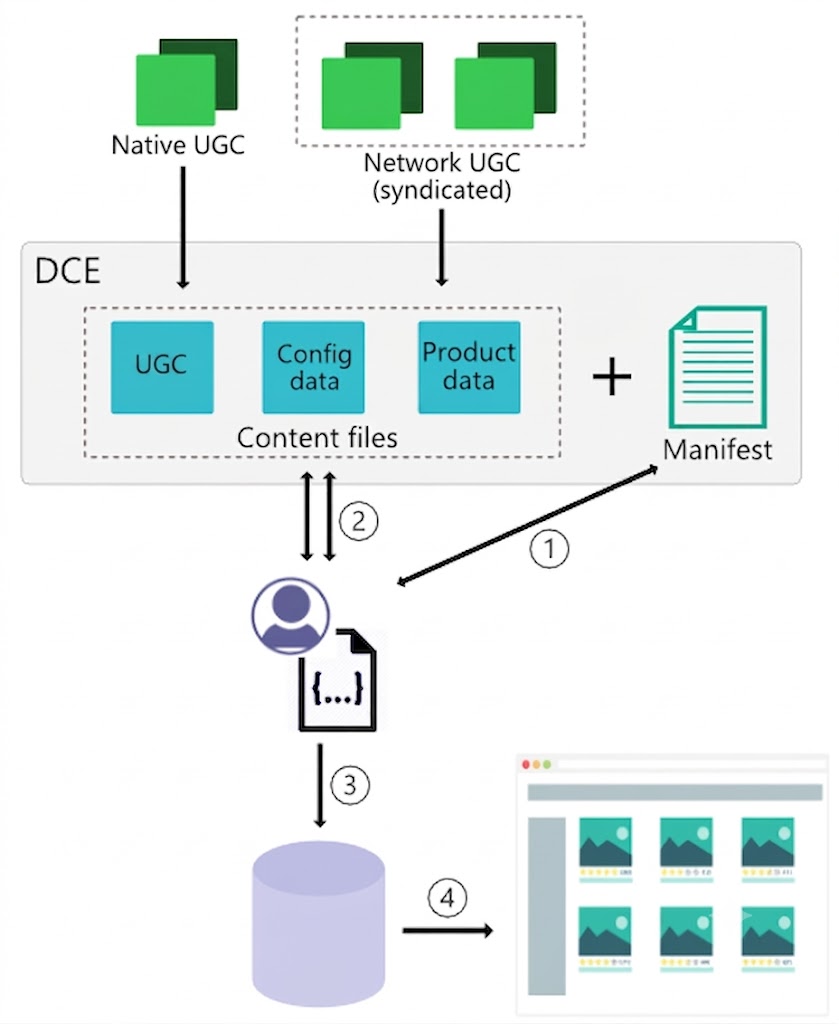
Native and syndicated content is aggregated and normalized to create DCE. A manifest file is also created and provides a map of the data and includes a URL for each file in DCE.
To import and display UGC included in DCE, complete the following steps:
- Request the manifest file.
- Request the content files that are listed in the manifest, which contain UGC, configuration data, and product data.
- Import the UGC, configuration, and product data into your database.
- Assemble the data relevant to the product that is displayed and render the UGC on your website or application.
Refer to the Bazaarvoice Developer site for complete information and instructions about the HTTPS interface.
