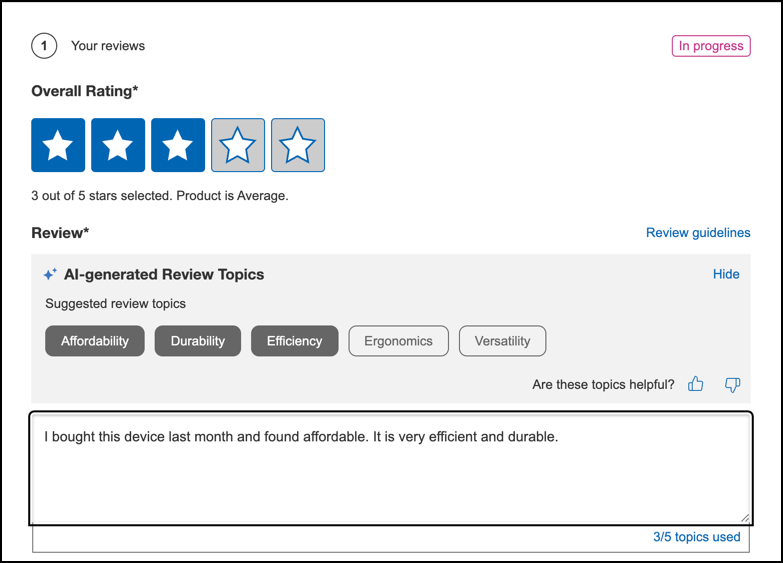
Enhance the quality of reviews by giving consumers real-time, AI-powered suggestions that help them write more useful and specific feedback. The Content Coach feature dynamically suggests relevant topics based on the product’s name, description, and category. When a consumer writes a review, the topics they mention are automatically highlighted.
- English
- Spanish
- French
- German
- Portuguese
- Arabic
- Japanese
- Dutch
- Italian
- Contact Bazaarvoice Support to enable this feature.
- Enable and configure Content Coach for your implementation.
-
Sign in to the Bazaarvoice Portal
 .
.
-
From the upper-right corner, select the settings icon
 .
. -
Under Configuration, select Ratings & Reviews. The Site Manager lists all your active deployment zones and implementations
- Under the Implementations section, select Edit next to the implementation you want to configure.
- In the User Experience section, select Display Options.
- Select the Ratings & Reviews tab.
- Under Content Coach, select Enabled.
- (Optional) To display Content Coach expanded or collapsed by default on mobile devices, under Display topics (Mobile submission form), select Show all or Hide all.

How it works
Initial suggestion: When the submission form opens, the AI Content Coach uses the Product ID to analyze product details and generate five single-word topic suggestions.
Real-time implicit matching: After the consumer enters five words, the AI Content Coach analyzes the review text and highlights suggested topics based on implicit meaning, even if the exact words do not appear in the review. This indicates that those topics are covered in the review.
Example:Product Suggested topics Review text Matched topics Beauty cream - Bloom
- Fragrance
- Resilience
- Texture
- Vibrancy
This is an amazing product and has really lifted the entire appeal of my skin. It looks much vibrant and soft on my skin post consistent application for just a few days. Results were almost immediate, and I would definitely recommend this product. - Texture
- Vibrancy
