Hosting the Multi-Product Submission (MPS) form on your custom domain allows you to embed the review process directly on your website. This ensures that consumers remain on your domain throughout the review process instead of being redirected to a Bazaarvoice-hosted page. Moving the submission process to your domain addresses several common consumer concerns and technical requirements:
- Reinforced brand trust: Consumers can submit feedback directly on your official website, thereby removing the hesitancy caused by unfamiliar domain redirects.
- Enhanced data privacy: By keeping the review process on your domain, you eliminate confusion regarding how personal data is shared with Bazaarvoice, satisfying compliance and privacy standards.
- Preserved analytics: Because the form is hosted on your domain, your internal tracking and analytics tools can monitor the consumer activity without losing data during a redirect.
Follow this guide to configure your site for client-hosted MPS.
Before you begin
Before you begin, ensure you have completed the following in your configuration:
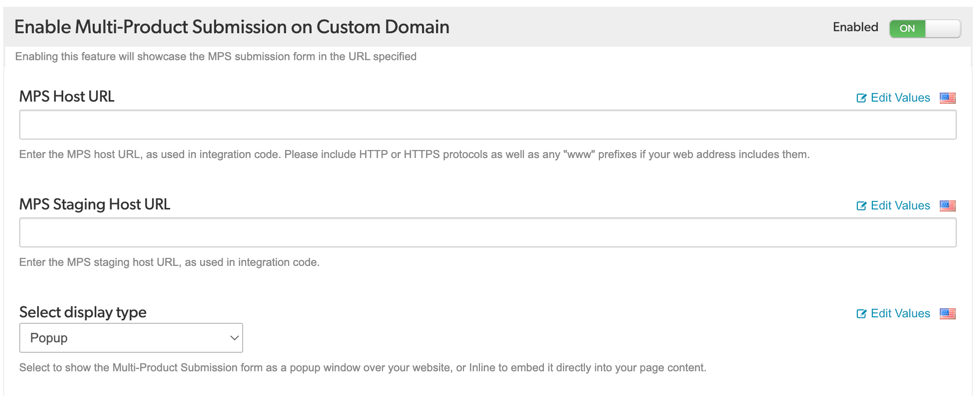
- Set Enable Multi-Product Submission on Custom Domain to ON.
- Enter your valid MPS host URL (Production) and MPS staging host URL.
- Select either Popup (modal window) or Inline (embedded directly into your page layout).
Host MPS form on your domain
-
Create an MPS Page
Create a page on your website to host the form. We recommend creating separate pages for staging and production.Example URLs:
- Staging: https://staging.yourdomain.com/reviews/submit
- Production: https://www.yourdomain.com/reviews/submit
- Add MPS container element
- Desktop (>768px): A shaded background appears behind the form for visual separation.
- Mobile and Tablet: The form displays full-width without a backdrop.
-
For Popup mode: Place this
divanywhere on the page to trigger the form. -
For Inline mode: Place this
divin the specific section where you want the form to appear within your layout. -
Update Content Security Policy
Update the Content Security Policy (CSP) rules to access Bazaarvoice domains. You can configure CSP by adding tags to your HTML page.Directive name
Directive Source
script-src
apps.bazaarvoice.com*.bazaarvoice.com
style-src
*.bazaarvoice.com
img-src
*.bazaarvoice.com
connect-src
*.bazaarvoice.com
frame-src
*.bazaarvoice.com (Add if you use iframes for submission) - Handle post-submission events (Optional)
Bazaarvoice provides two display modes for client-hosted MPS.
Popup mode: The MPS form opens in a modal window. A shaded background appears behind the modal to keep the focus on the form. Your page content remains visible but is disabled until the consumer closes the modal.
Inline mode: The form embeds directly into a specific section on your page.

Implementation:
Insert the following HTML element where you want the form to appear:
HTML |
<div data-bv-show="multi_submission"></div> |
div. Bazaarvoice manages all layout and styling within the container.
If you have enabled cookie consent for your Bazaarvoice integration, also add cdn.cookielaw.org to your script-src. To learn more about CSP guidelines, refer to CSP Support for V2 Applications.
When consumers close the form, Bazaarvoice triggers an mpsClose event. You can use this event to trigger custom actions on your site,
such as automatically redirecting the consumer to a Thank You page or displaying a custom message after they complete the review.
JavaScript |
window.bvCallback = function (BV) { BV.swat_submission.on('mpsClose', function (data) { console.log('Form closed', data); // data.completed: true if all products were reviewed // data.productsSubmitted: number of products reviewed if (data.completed) { window.location.href = '/thank-you'; } }); }; |
How MPS hosting works
-
Automatic redirects: If an existing Review Request Email points to a Bazaarvoice-hosted URL, we automatically redirect the consumer to your new custom domain page while preserving all URL parameters.
-
Analytics: Because the form lives on your domain, your analytics tools (Google Analytics or Adobe Analytics) will automatically track the session without losing tracking parameters.
-
Cookie consent: If you've enabled cookie consent for your Bazaarvoice integration, the banner behavior automatically adapts to your domain. Because the MPS form is now hosted on your website, cookies and local storage operate in a first-party context.
-
Accessibility:
-
Popup mode: Keyboard focus is restricted within the form until it is closed. The Escape key closes the form.
-
Inline mode: The form handles navigation and keyboard focus automatically. If a consumer opens a sub-modal within the form (such as Terms & Conditions), focus is restricted to that modal until it is closed. Once the sub-modal is closed, focus returns to the main form.
-
Implementation checklist
|
Task
|
Description
|
|---|---|
|
Create MPS pages
|
Create dedicated staging and production pages on your domain.
|
|
Verify BV loader
|
Ensure the bv.js is loading correctly on your MPS pages.
|
Add container div
|
Confirm div data-bv-show="multi_submission" is present on the page.
|
|
Update CSP headers
|
Allow *.bazaarvoice.com in your security policy (if applicable). |
|
Configuration toggle
|
Verify Enable Multi-Product Submission on Custom Domain is ON.
|
|
Select display mode
|
Ensure either Popup or Inline is selected in your configuration.
|
|
Set host URLs
|
Enter your production and staging URLs in your configuration.
|
|
Test staging page
|
Test using a valid Review Request Email link or a manual test URL
|
|
Automatic redirect
|
(Optional) Confirm the automatic redirect (mpsClose event) is working for custom redirects.
|
FAQ: MPS hosting on custom domains
Do I need to update my Review Request Email templates?
No. Bazaarvoice automatically redirects links from the old hosted pages to your new custom domain.
Does the same implementation apply to both Popup and Inline modes?
Yes. Your page implementation is identical for both. The specific behavior is controlled by your settings in configuration.
Can I customize the look of the form?
Yes. You can toggle the brand logo and the Visit Homepage button in your configuration. Further CSS customization is not currently supported to ensure functional integrity.
Will the form render if the URL is incorrect or the page is missing elements?
No. If the required container div (data-bv-show) or the bv.js script is missing from the host page, the MPS form will not render. Ensure all prerequisites and implementation steps are followed.
Will the form display if URL parameters are missing?
No. If essential parameters (such as user and products) are absent from the URL, the container will remain empty. Ensure your site allows the exact parameter names as documented.
What happens if my page is down?
Bazaarvoice does not automatically fail over to a hosted page. Ensure your MPS page has high availability. If your site experiences an outage, contact Bazaarvoice Support to revert to Bazaarvoice hosting temporarily.
