A multi-product listing page enables the collection of reviews for multiple products from a single user. They select a product, write their review, and submit it. After submitting, they return to the main list to review other products. Designed with mobile users in mind, multi-product listing page encourages customers to leave multiple reviews by displaying all of their purchases on one page.
Unlike legacy submission flows where content is only captured if a consumer submits reviews at the very end of the page, the modern Review Submission Form captures the responses immediately even if they don't finish answering all the questions in the form. Capturing each response progressively minimizes content lost due to form abandonment. To enable the progressive submission form, refer to Enable progressive submission for multi-product reviews.

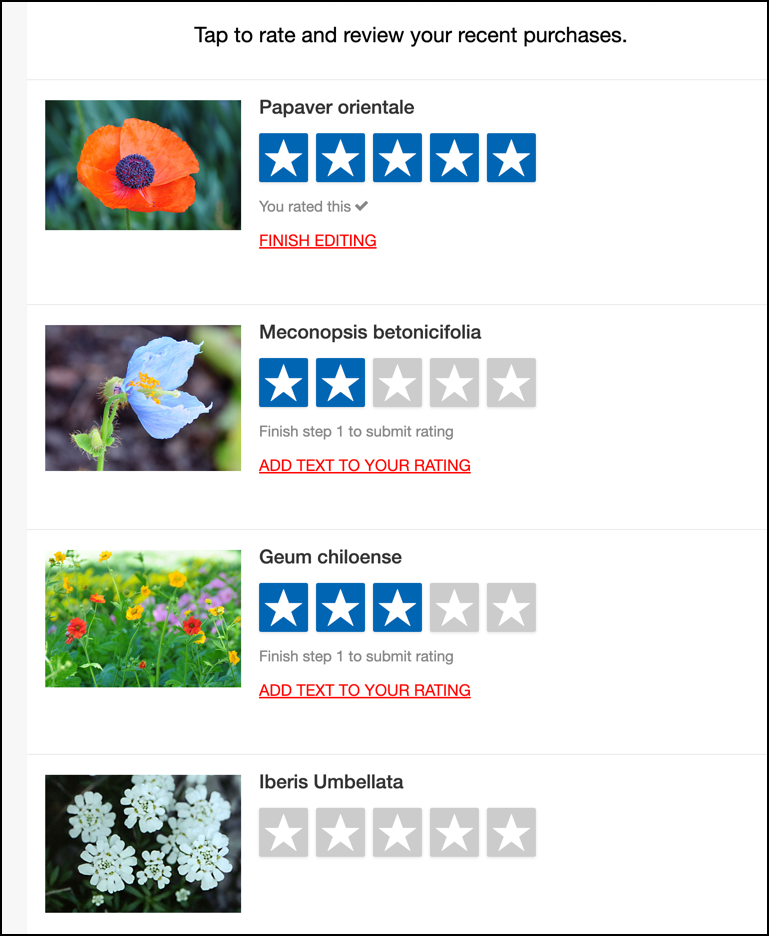
Within this listing page, review collection is driven by one of two submission form types:
| Features | Review Submission Form (Recommended) | MPS Form (Legacy) |
| Submission style | Breaks questions into a maximum of five short sections, saving entries progressively to minimize abandonment. Unlocks smart features like Content Coach, native video, and WCAG accessibility. | Opens a longer form for each product that displays questions all at once before returning to the product list. Does not support smart features or accessibility. |
| Terms & Conditions | Built seamlessly into the progressive submission flow without stopping the user. | Forces users onto a dedicated page that they must explicitly accept before accessing the review form. |
| Modern Features | Content Coach, Visual Content Coach, Native Video, Talk-to-Text. | Basic photo uploads and ratings. |
| Accessibility | Meets modern web accessibility standards (WCAG compliant). | Does not meet current accessibility standards. |
| Brand styling | Unified layout, modern styling, and native dark mode support. | Legacy layout and styling. |
Multi-product reviews with Review Submission form
To optimize review collection, boost completion rates, and eliminate the hassle of maintaining multiple forms, Bazaarvoice is unifying all review submission flows into a single, modern Review Submission Form. Post-purchase Review Request Emails (RRE) now direct consumers straight to this latest form instead of the legacy MPS form. This updated experience provides a more streamlined, accessible, and low-friction review journey while preserving the multi-product submission flow. Your brand also gains immediate access to newer collection capabilities, including Content Coach, native video uploads, accessibility compliance, and ongoing future submission innovations.
This form allows consumers to collect multiple reviews progressively from a single review request. Consumers submit reviews through a step-by-step submission process. After they submit the first review, they are automatically directed to a list of other products to review. For more information, refer to Review Submission Form in multi-product reviews.
Key benefits of transitioning
Transitioning from the MPS Form to the Review Submission Form significantly improves review collection by offering a consistent, accessible experience for shoppers while reducing administrative overhead for your team.
- Improved submission rates: Connecting your Review Request Emails directly to the Review Submission Form (replacing MPS Form) eliminates the standalone Terms and Conditions page, and the Review Submission Form streamlines the process into short sections, making it faster and easier for shoppers to complete their reviews.
-
Better review quality: The Review Submission Form includes smart features not available on MPS Form, such as:
- Content Coach: Prompts that guide consumers to write more detailed and helpful reviews.
- Native Video: Shoppers can upload their video content directly within the submission flow, adding rich visual proof to your product pages.
- Talk-to-Text capabilities: Allow shoppers to dictate their feedback directly using voice input instead of typing. This convenient, hands-free option reduces friction and helps shoppers leave longer, more detailed reviews.
- Visual Content Coach: Provides AI generated media ideas to shoppers on the photo or video uploads, helping your brand capture higher-quality, relevant media directly within the submission flow.
- Consistent brand experience: Consumers who write reviews through post-purchase emails open the standard Review Submission Form. Using this single form everywhere ensures consumers always see the same familiar layout, questions, brand style, and supports dark mode background.
- Meets accessibility standards: The Review Submission Form is designed so that everyone—including shoppers who rely on screen readers or keyboard navigation—can easily leave a review. The legacy MPS Form does not meet these accessibility standards.
Multi-product reviews with MPS form (legacy)
The MPS form allows consumers to rate and review products using the default Ratings & Reviews submission form. The form displays a list of recent purchases. Consumer selects a product, completes the entire form, and submits their review. They will automatically return to the main list to review other products.
Multi-product review submission video (legacy)
Watch this video to learn how a contributor fills in multi-product reviews in MPS form.
Multi-product submission form workflow
The multi-product submission (MPS) form is designed to work seamlessly on a consumer’s. When you’re configuring questions for an MPS form, give consumers an effortless experience that will encourage them to review all of their recently purchased products.
How MPS listing page works?
Keep the following in mind when designing your MPS listing page:
- Consumers select the star icons to submit the rating of each product. The five-star rating system makes it easy for consumers to rate the products they just purchased from you.
- Consumers accept the Terms & Conditions. The review form automatically loads for the rated product.
- Consumers add review text and answer questions for each specific product, such as "Was it fit for purpose?" or "How would you rate the quality?", etc.
-
Required questions (such as “Write your review” and “Add your review title”) are included in the Step 1 section of the form.

- For the best user experience, minimize the number of required questions in your submission form.
- The field for entering your "Review Title" comes after the "Review Text" because research indicates that consumers find it easier to write the text for their review first and then to come up with a review title afterward.
- Consumers upload images when submitting review forms if this setting is configured as mandatory. This setting prevents submissions that contains only ratings. Consumers can upload up to six photos with each review.
-
Consumers answer the submission form questions sequentially. They submit question 1, then move on to question 2, and so on until all questions have been answered. Refer to progressive answer submission for additional information. Here are some example questions:
- Write your review
- Add a review title
- Add photos (max. 6)
- Add a YouTube video
- Best uses
- Did you receive an incentive to write this review?
- After completing a review for one product the consumer selects the Submit button. They are automatically redirected back to the initial list of purchased products where they can continue to rate and review the rest of their purchases.
Limitations in multi-product review submission links
Product limitations in submission links are implemented to enhance the consumer experience and prevent link failures. The submission link for RRE is limited to 25 products, while the RRR has a limit of 40 products.
How are products shortlisted?
The algorithm for shortlisting products begins by selecting the most expensive product, followed by the one with the fewest reviews. It then continues with the second most expensive product and the second least-reviewed product, repeating this process until the above mentioned limit is reached. The products that are not selected will not appear on the review submission page.
To configure multi-product review submission for your implementation, refer to:
