Configure multi-product submission form
To enable multi-product submission form, refer to the following topics for more information:
- Enable multi-product submission forms for Bazaarvoice-hosted review requests
- Create a multi-product submission form ssURL
- Customize multi-product submission form (using the Style Editor)
Enable multi-product submission forms for review requests
Complete the following steps to enable and configure multi-product submission forms for Bazaarvoice-hosted review requests:
- Sign in to the Bazaarvoice Portal
 .
. - From the upper-right corner, select your instance.
- Select the settings icon
 .
. - Under Configuration, select Ratings & Reviews. The Site Manager lists all your active deployment zones and implementations.
- Under Implementations, select Edit next to the implementation for which you want to configure submission forms.
- From the menu on the left side of the page, select Display Options under User Experience.
- Select the Ratings & Reviews tab.
- Go to the Multi-Product Submission (Standard and Custom review request email templates) section at the bottom of the page. Turn on the toggle switch on the right side of the section to enable multi-product submission forms.
Note: This toggle switch only enables multi-product submission forms for standard and custom review request email template types. In-mail template types always use a multi-product submission form.
- Select when you want your review request to link to a multi-product submission form instead of the default single-product submission form. Choose from the following options:
- For all transactions—All review requests will direct your customers to the multi-product submission form, whether they purchased one or multiple products.
- Only for transactions with multiple products—If the customer purchases more than one product, they will receive a review request link to a multi-product submission form. Purchases of a single product will trigger your default single-product submission form.
- Never only use single-product submission form—review requests for all transactions will link to your default single-product submission form configured with the submission form editor.
- (Optional) Go to Require Review Text (Multi-Product and Review Submission Forms) and Require Review Title (Multi-Product and Review Submission Forms) in the Review Submission section. Select Enabled to make it mandatory for contributors to enter review text and a title to submit reviews when using a multi-product submission form. Enabling this setting prevents the submission of ratings-only reviews in the multi-product submission form. We also recommend you upload a company logo to display on the multi-product submission (MPS) form. If you're sending your review request or using a custom email template, then you may not have a company logo loaded into our system.


Enable progressive submission form for multi-product reviews
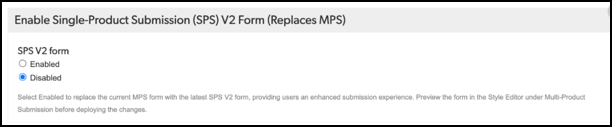
To enable the progressive submission form for multi-product reviews, you must enable and deploy the Review Submission form (Replaces MPS) option in your configuration. This option is disabled by default.
Create a multi-product ssURL
Refer to Create a multi-product ssURL for instructions.
Customize multi-product submission form styles (Style Editor)
The multi-product submission form inherits styling from your Ratings & Reviews display. Use the Style Editor in the configuration to preview and customize multi-product submission form display settings like star color, button styling, and accent colors. To preview the customized styles in the Style Editor page:
- Sign in to the Bazaarvoice Portal.
- From the upper-right corner, select your instance.
- Select the settings icon .
- Under Configuration, select Ratings & Reviews. The Site Manager lists all your active deployment zones and implementations.
- Under Implementations, select Edit next to the implementation you want to configure.
- Under User Experience, select Style Editor. For each feature enabled in your implementation, the Style Editor page shows a preview of the display elements.
- Select Multi-product review submission to preview the customized styles.
