The Top Contributor (Merit) badge is given to a contributor whose high volume and top voted content earns them the highest calculated useful content score.

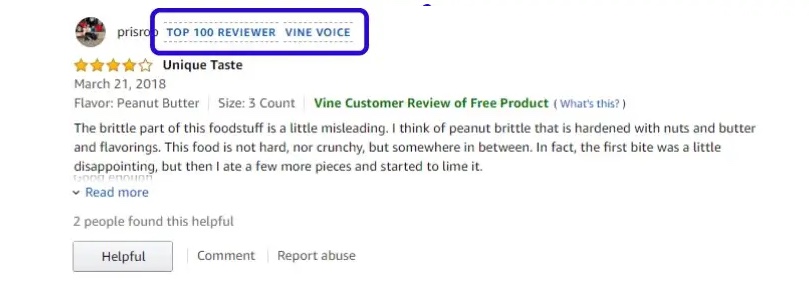
The Top Contributor badge system offers tiered recognition to identify and celebrate users who provide the most useful content to the community:
| Top Contributors (Merit) | Description |
|---|---|
| Top Contributors | Indicates the top contributor based on useful content score. |
| Top 10 Contributor | Indicates one of the top 10 contributors based on useful content score. |
| Top 25 Contributor | Indicates one of the top 10 contributors based on useful content score. |
| Top 50 Contributor | Indicates one of the top 10 contributors based on useful content score. |
| Top 100 Contributor | Indicates one of the top 10 contributors based on useful content score. |
| Top 250 Contributor | Indicates one of the top 10 contributors based on useful content score. |
| Top 500 Contributor | Indicates one of the top 10 contributors based on useful content score. |
| Top 100 0Contributor | Indicates one of the top 10 contributors based on useful content score. |
Style Top Contributor badge
You can change the look of the default Top Contributor badge. You can to match it to your company's specific brand and design. Learn more about styling badges.
Top Contributor (Merit) badge association with contributor profiles
As the Top Contributor (Merit) badge is a contributor badge, it’s tied to either a Contributor ID or Contributor Profile rather than an individual user account.
- A single contributor ID can be shared and assigned to multiple users. For example, several employees in a department might share one Top Contributor profile.
- Once set up, the Top Contributor badge automatically appears on all content submitted using that specific contributor ID, including:
- Reviews
- Answers submitted to Questions & Answers
- Comments
Set up Top Contributor badge
Before you begin, enable the Top Contributor (Merit) badge using the Badge Editor tool.
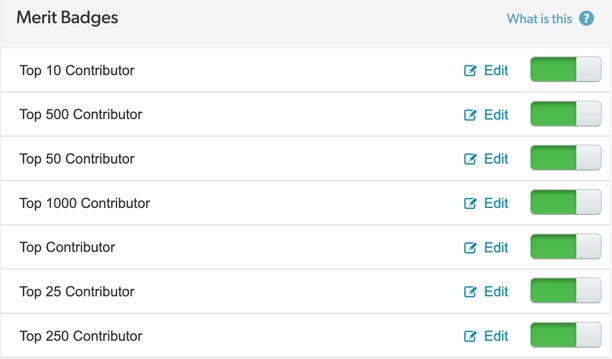
Assign Top Contributor (Merit) badge
Content Administrator Account Administrator
To add a top contributor badge:
- Sign in to the Bazaarvoice Portal.
- From the navigation bar, select Ratings & Reviews > Reviews.
- From the list view, navigate to the action menu (...) in the upper-right corner.
- Select Manage contributors. The Contributors page appears.
- Filter your list of contributors or enter the Contributor ID in the search bar.
- Select the Contributor ID hyperlink. The Contributor details modal appears.
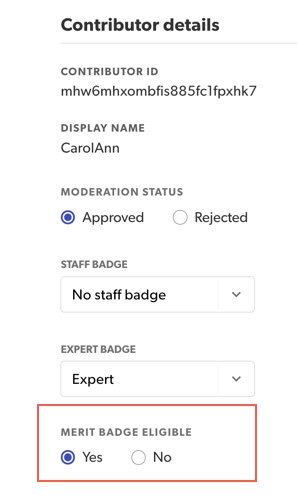
- Select the MERIT BADGE ELIGIBLE option.
- Select Save updates.
How the badge is calculated

This section explains the criteria, weighting, and limits used to calculate the top contributor badge ranking. The calculation formula runs nightly, updating based on activity published in the last 24 hours.
1. Useful content score
The top contributor badge score is calculated daily using a formula that combines a contributor's content submissions and the community feedback they receive.
| Contribution type | Weighting
(multiplier) | Description |
|---|---|---|
| Full contributions | 1.0x (baseline) | Full text review or approved answer. |
| Helpfulness votes | 0.3x | Votes received indicating content was helpful. |
| "Best Answer" votes | 0.3x | Votes received specifically designating an answer as Best Answer. |
| "Ratings-only” reviews | 0.2x | Reviews submitted without full text, star ratings only, are often seen as less useful. |
The weighting system results in the following approximate equivalencies for scoring purposes:
- Approximately 3 Helpful Votes equal the value of one full contribution (either a full review or an approved answer).
- Approximately 3 Best Answer votes equal the value of one full contribution.
2. Qualification limits (eligibility)
To ensure the prestige of the Top Contributor badge, the system enforces two qualification limits based on your site's contributor population:
A. Population cap (prestige maintenance)
Bazaarvoice ensures the number of badges assigned grows relative to your distinct contributor base. The system is designed to award the Top Contributor (Merit) badge to no more than 20% of your site's active contributor population.
B. Minimum contribution threshold
A contributor must first meet a minimum content requirement to be eligible for any badge:
- An individual must provide a minimum of two approved contributions (a combination of reviews and/or answers).
- This minimum threshold is client-configurable.
3. Tie Resolution
In the event that two or more contributors have an identical merit score, the system employs the following tie-breaking rules:
| Step | Tie breaker | Rationale |
|---|---|---|
| Step one: Character count | The contributor with the greater cumulative character count from full text contributions (pros, cons, review text, answer text) receives the higher rank. | Character count is reserved for tiebreaking, as helpfulness is already a direct factor in the merit score. |
| Step two: Identical score | If contributors remain tied after comparing both the top contributor score and character count, all tied contributors will receive the badge. | For example, If contributors ranked #10 and #11 are tied, they both receive the top 10 contributor badge. The pool for the next badge, such as the top 25 badge, is adjusted accordingly (starting at rank #12). |
