The Featured badge highlights the most valuable or relevant consumer feedback directly on your site.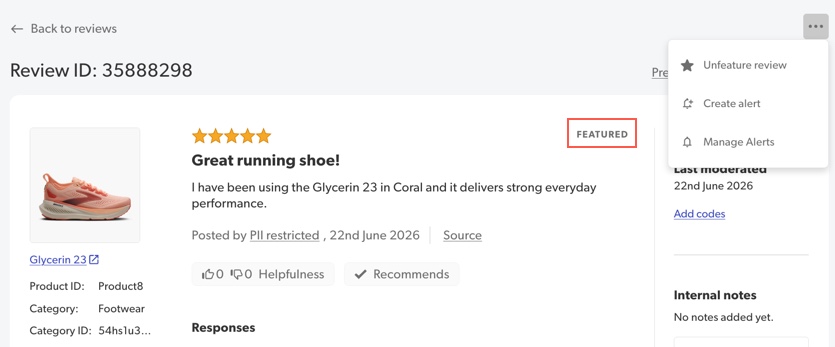
Featuring a review can quickly guide consumers, offering them a great example of product satisfaction or detailed insights they need.
- Featured reviews will have a Featured label both in the Bazaarvoice content management solution and on your site.
- In your content management solution, the FEATURED label appears directly opposite the review stars.
- To find your featured reviews in Portal, select the Content filter and select Featured.
- There is no limit to the number of reviews you can feature.
Enable the Featured badge
There is no limit to the number of reviews you can feature.

- Sign in to Bazaarvoice Portal
 .
. - Select your instance.
- From the upper-right corner, select the settings icon
 .
. - Select Ratings & Reviews.
- Go to the Implementations section and select Edit next to the Implementation you want to configure.

- In the left-side menu, select the Badge Editor.
- Under Content Badges, locate the row for Featured and turn on the toggle switch to enable this badge.

- (Optional) Select Edit to customize the default badge. Learn more about styling badges.
- Deploy any changes to your implementation.

Add a featured badge
To add a featured badge to a review:
- Sign in to the Bazaarvoice Portal .
- From the navigation bar, select Ratings & Reviews.
- Search for the review you want to feature.
- Select Review details to open the detail view.
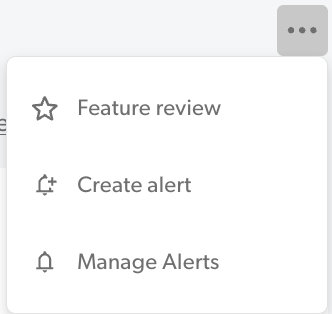
- Select the ellipses icon (...) in the upper-right corner.
- Select Feature review.
Sort by featured reviews
To highlight featured reviews on your site, sort them to show Featured reviews at the top of a product page.
You can configure how you want to automatically sort reviews for your consumers, or how you allow consumers to sort reviews themselves.
Most relevant sorting algorithm
The algorithm considers the following factors to establish a relevancy ranking for each review:
Core relevancy factors
- Submission date: Prioritizing reviews that are more recent.
- Review length: Considering the depth and detail of the feedback.
- Media content: Presence of photos or videos attached to the review.
- Helpfulness votes: The number of Helpful or Not Helpful votes it has received.
Enhanced sorting factors
- Featured status: Whether the review has been manually selected and "featured."
- Verified purchaser: Whether the review comes from a customer who is a verified buyer of the product.
- Approved comments: The inclusion of approved, likely insightful, responses, or comments within the review thread.
This multi-factor approach ensures consumers see the most valuable and trustworthy reviews first, simplifying their purchasing decision.
