The Review Submission Form enables a progressive submission of reviews by breaking the review submission into smaller, manageable sections. This approach streamlines the submission process, increases consumer engagement, and helps you collect more ratings and reviews. It offers a multi-step submission experience and drives higher conversion rates by providing consumers with a more engaging experience.
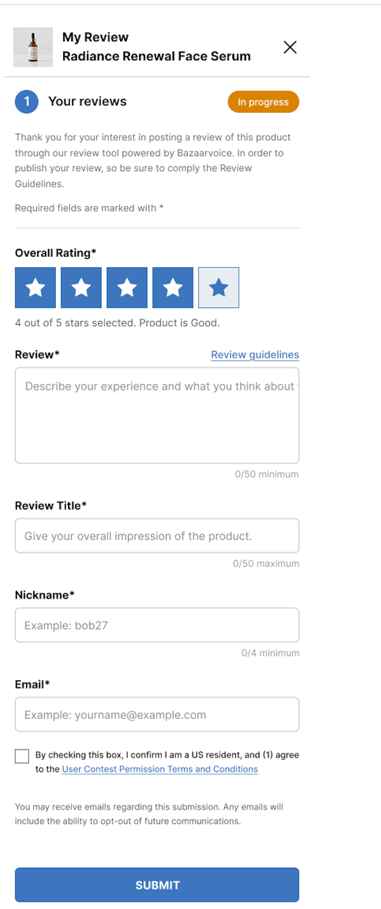
Simplified Review Submission Form
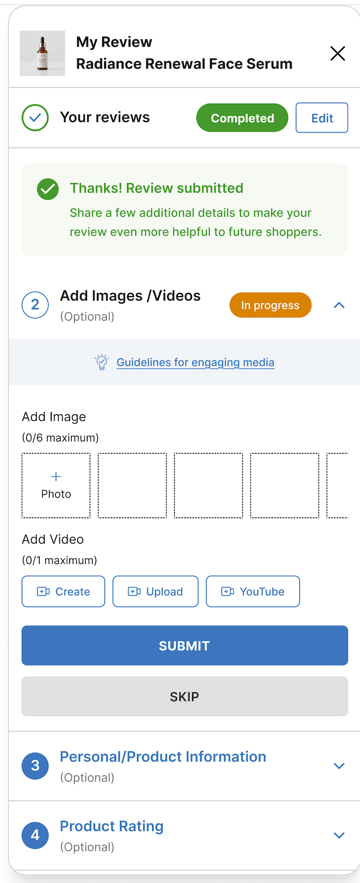
You can configure the submission form experience to display a simplified, two-stage form layout. When you enable the Simplified Review submission in your configuration, the form initially presents only mandatory fields to the consumer. The simplified form reduces friction by streamlining the initial review experience for shoppers. By presenting only mandatory fields first and progressively revealing optional questions after the required section is submitted, shoppers can complete reviews faster and with greater confidence. This approach lowers drop-off rates, driving higher conversion and overall review volume for your brand.
To learn how to configure Review Submission Form and Simplified Review Submission Form, refer to Review Submission options in Configure Ratings & Reviews.

|
|
|
|---|
Key benefits
- Reduces initial cognitive load: Simplifies the initial layout so the review process feels lighter and less complicated.
- Accelerates submission speed: Presents a simpler first impression, giving shoppers confidence to submit feedback faster.
- Preserves rich content collection: Captures required ratings upfront while keeping optional questions available for highly engaged reviewers.
- Requires zero technical implementation: Requires no implementation changes as it can be enabled through configuration.
Submission form redirects & data injection
Configure how consumers access the form, where they are redirected to after writing a review, and how data is passed into the submission flow.
Specify an alternate return page
By default, customers return to the URL where they selected the Write a review link to access the review submission form. However, you can choose to specify a different return page.
Include the following code on the page where the user selects the Write a review link:
JavaScript |
```javascript $BV.configure('global', { returnUrl : 'http://AlternateReturnPage.com' }); ``` |
Set up same-page submission links for Ratings & Reviews
You can add same-page submission links to
- Pages where you are hosting Bazaarvoice content, such as the product display page.
- Pages where there is no Bazaarvoice content, such as a user's account page.
Same-page submission links for pages with Bazaarvoice content
To add submission links to a page where Bazaarvoice content is hosted:
-
Add the appropriate submission link code.
-
Insert the following JavaScript code on any page where you want to trigger the review submission form:
JavaScriptBV.ui('rr', 'submit_review',{productId : 'PRODUCTID'});
-
If you want to track a submission against a specific campaign, insert campaignID : 'CAMPAIGNID' to the above mentioned JavaScript code.
Example:JavaScriptBV.ui('rr', 'submit_review',{productId : 'PRODUCTID', campaignId : 'CAMPAIGNID'});
-
Insert the following HTML code to load the submission form.
<div data-bv-show="inpage_submission" data-bv-product-id="ExternalId" data-bv-campaign-id="abc123"></div>
- The data-bv-show attribute instructs the BV loader to load an inpage submission form.
-
The data-bv-product-id attribute instructs the BV loader to display the feature for a specified product ID. This product ID must match the
ExternalIdprovided in the product catalog. - The data-bv-campaign-id attribute instructs the BV loader to add the required campaign ID to help track the submission flow.
Same-page submission links for pages without Bazaarvoice content
To add links to a page where Bazaarvoice content is not hosted:
-
Add the appropriate submission link code.
-
Insert the following JavaScript code on the page, replacing <client_name>, <site_ID>, and locale with your values.
-
Use the following code for the staging environment (the staging environment is for testing and development and is typically only visible internally. Ensure each Bazaarvoice URL referenced in the code contains in the domain).
<script type="text/javascript" src="https://display.ugc.bazaarvoice.com/bvstaging/static/<client_name>/<site_ID>/<locale>/bv.js"></script>
-
Use the following code for the production environment. The production environment is visible externally. Content in the production environment is visible on your live website.
<script type="text/javascript" src="https://display.ugc.bazaarvoice.com/static/<client_name>/<site_ID>/<locale>/bv.js"></script>
-
Use the following code for the staging environment (the staging environment is for testing and development and is typically only visible internally. Ensure each Bazaarvoice URL referenced in the code contains in the domain).
Data injection
You can pre-populate ("inject") data for some fields on submission forms. Data injection uses a shared key plus hashing to validate the population of data, such as email addresses.
You might want to pre-populate data for the following reasons:
- Help customers complete submissions more quickly. You can provide information you know about your customers—such as name, gender, age, or location—to make form completion faster and easier.
- By eliminating the need for users to enter repetitive details, you encourage a higher rate of reviews.
- Provide data for reporting and analytics. You can tie reviews to specific data that exists in your CRM, such as an order ID. This information isn't visible to your customers.
- Tag a review with the verified purchaser badge to indicate that the contributor has experience with the product or service being reviewed, thereby increasing trust in the content of the review.
- Tag a review with the incentivized review badge to disclose that the contributor received a free product in exchange for writing a review. This disclosure increases consumer trust in reviews on your website. Refer to Incentivized reviews for instructions.
Data injection is available for implementations that use either site or hosted authentication. Refer to Submission form data injection for information about injecting data using hosted and site authentication.
Resubmit rejected reviews
After completing a purchase, consumers can submit a product review within 90 days from their date of purchase. If a submitted review fails to meet moderation guidelines and is rejected, consumers can modify and resubmit these rejected reviews. Bazaarvoice enforces the following submission rules for allowing a resubmission of the rejected reviews.
- The submission form allows consumers to edit and resubmit a rejected review for up to 90 days.
- The 90-day window is calculated strictly from the first/original submission date of the review. The form does not recalculate or extend this window based on the date the review was rejected.
The submission form evaluates the following product-level settings to determine eligibility:
- Only the most recently submitted review for a product is eligible for resubmission through the Review Submission form.
-
For multiple reviews per product:
-
Only the most recently submitted review for a specific product is eligible for resubmission.
-
Any older rejected review that is not the latest submission is blocked from resubmission.
-
